Lab Session 2: Timers
Estimated time: 1.5 hours (1 session)
Description
The goal of this session is to learn the different ways in which a microcontroller can perform timing operations. As seen previously, the delay() function can be used to wait for a specified amount of time. However, to solve slightly more complex problems, it becomes necessary to use timers, which allow us to handle periodic events and, in some cases, interrupt the normal execution of the program.
1. Working with real hardware
1.1. Using an external library: Ticker (software timers)
The Arduino Ticker library allows you to easily create timer callbacks that call a function at a predetermined interval. The following example shows how to perform timing operations using the Ticker library and the attach() or attach_ms() functions.
#include <M5Core2.h>   // M5Stack Core2 library
#include <Ticker.h>    // Ticker library

#define LED_PIN 14     // GPIO pin where the LED is connected on the M5Core2

Ticker blinker;        // Create a Ticker object. It will call a function at regular intervals.

/*
  This function (callback) will be called by the Ticker at the configured time interval.
  It simply toggles the LED state:
    - digitalRead(LED_PIN) reads the current state (HIGH/LOW)
    - ! inverts that state
    - digitalWrite writes the inverted state back to the pin
*/
void changeState()
{
    digitalWrite(LED_PIN, !(digitalRead(LED_PIN)));
}

void setup()
{
    M5.begin();          // Initialize the M5Core2 hardware (display, I2C, etc.)
    pinMode(LED_PIN, OUTPUT); // Configure the LED pin as an output

    // Initialize the Ticker to call changeState() periodically.
    // attach() accepts time in seconds (here 0.5 s = 500 ms).
    // If you prefer milliseconds, use attach_ms(milliseconds, callback).
    blinker.attach(0.5, changeState);
}

void loop()
{
    // Empty: the Ticker handles the periodic LED toggling asynchronously.
}
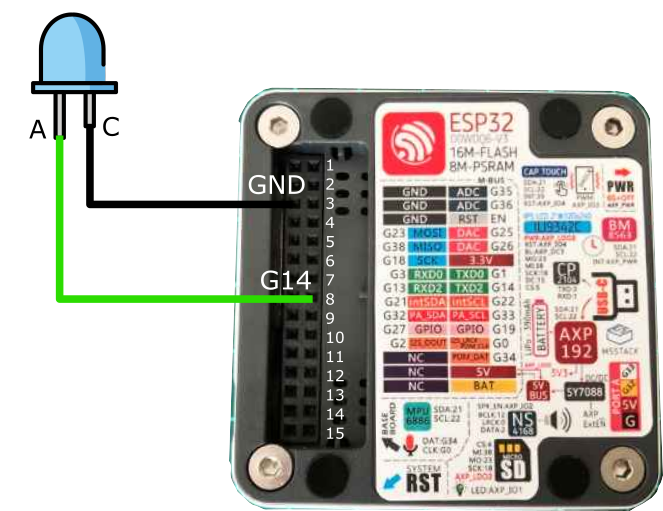
Connect an LED to GPIO14 on the M5Core2 and modify this example so that the LED changes state every second instead of every 500 ms.
1.2. Using hardware timers
However, as stated in the Ticker library documentation, the library does not use hardware timer interrupts; it relies on the micros() and millis() functions. This means that our ability to develop applications with different timer configurations or to implement multitasking applications would be highly limited if we restricted ourselves to using only this library.
Perform the previous exercise again, but this time use an interrupt generated directly by a hardware timer. Configure the timer so that the LED changes state every second, and verify with a stopwatch that it works correctly.
2. Working in simulation
You can perform exactly the same exercises in simulation. Use the same LED circuit as in the previous lab sessions.