Lab 1: Cartesian trajectory planning
1. Smooth Cartesian interpolation
Cartesian interpolation is characterized by a linear variation of position and orientation. While position can be interpolated linearly in Cartesian space, orientation interpolation depends on how orientation is represented. As described in the course, the most appropriate way to do this is by using quaternions.
Info
If you interpolate orientation using quaternions, you're performing Spherical Linear Interpolation (slerp). The original paper is available here. The slerp method is already implemented in tf2 (you can check the ROS 2 Humble implementation here), but in this lab you will implement it yourself.
Also, when linking two rectilinear displacements, a velocity discontinuity occurs at the transition point. Figure 1 shows the described situation, using the example of concatenating a displacement from location \(P_0\) to \(P_1\) (first segment) with another from \(P_1\) to \(P_2\) (second segment). To avoid the velocity discontinuity that would occur at \(P_1\), a constant acceleration is used to linearly adapt the velocity variation from the first segment to the second, resulting in a smooth transition across \(P_1\).
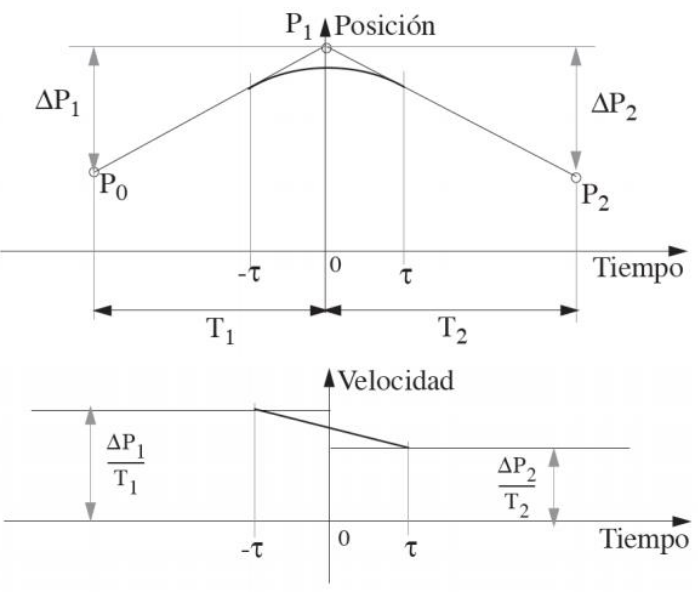
Figure 1. Diagram of the variation of position and velocity in the movement from \(P_0\) to \(P_2\) via \(P_1\).
This way, \(-\tau\) units of time before reaching \(P_1\) (time 0), the velocity will be linearly changed over time from \(\Delta P_1/T_1\) to \(\Delta P_2/T_2\), to accommodate the velocity \(\tau\) units of time after passing \(P_1\). Thus, the problem is defined as the calculation of a quadratic function \(\mathbf{p}(t)\) that starts at point \(P_A\) and ends at \(P_B\) (start and end points of the smoothing) defined in the time range \([-\tau, \tau]\).
Applying the boundary conditions at both ends of the segment and defining the acceleration in the area, the position is obtained as:
$$ \mathbf{p}(t) = \mathbf{p}_1 - \frac{(\tau - t)^2}{4\tau T_1} \Delta \mathbf{p}_1 + \frac{(\tau + t)^2}{4\tau T_2} \Delta \mathbf{p}_2 $$
And the orientation as:
$$ \mathbf{q}(t) = \mathbf{q}_1 \cdot \mathbf{q} \left[\frac{-(\tau - t)^2}{4\tau T_1} \theta_1, \mathbf{n}_1 \right] \cdot \mathbf{q} \left[ \frac{(\tau + t)^2}{4\tau T_2} \theta_2, \mathbf{n}_2 \right] $$
2. Setup ROS 2
For this lab session we will use ROS 2 Humble.
This is optional: you may want to install uma_environment_tools, which installs ROS 2 Humble and some important packages and libraries that may be useful later in the course. In that repo, you'll find the required steps to install it.
If you already have a native version of Ubuntu 22.04 installed, you can skip steps 1 and 2.
A video of the installation, including the troubleshooting (if you don't find the errors, you don't need to run that part!) is shown below. Note that the video shows the installation with WSL. If you're using a native Ubuntu 22.04, you can skip the first instruction.
2.1. Testing the UMA environment
If you have installed the UMA environment, you should see that everything is working correctly.
Try the following:
Use advanced_robotics_ws as your workspace name.
If, after installing it, you go to your catkin workspace folder and when you run this alias
you find an error like 'ROS colcon build is not installed', then you'll need to uninstall ROS and install the environment again:
sudo apt remove ~nros-humble-* && sudo apt autoremove
sudo rm /etc/apt/sources.list.d/ros2.list
sudo apt update
sudo apt autoremove
# Consider upgrading for packages previously shadowed.
sudo apt upgrade
cd ~/uma_environment_tools/scripts
./install_uma_environment.sh
Then you'll need to run
3. Introduction
This exercise illustrates Cartesian trajectory generation using one of the methodologies studied in this course. For this purpose, you'll use the Cartesian Trajectory Planning package.
3.1. Install the dependencies
First, you'll need to install a series of dependencies:
sudo apt install ros-${ROS_DISTRO}-xacro
sudo apt install ros-${ROS_DISTRO}-gazebo-ros-pkgs
sudo  apt install ros-${ROS_DISTRO}-ros2-control ros-${ROS_DISTRO}-ros2-controllers ros-${ROS_DISTRO}-gazebo-ros2-control
sudo apt-get install -y ros-${ROS_DISTRO}-joint-state-publisher-gui ros-${ROS_DISTRO}-rviz2
If you find an error while trying to install these dependencies, you will likely need to update the package repositories and upgrade them to the latest version. Once upgraded, you can install the dependencies using the commands above.
3.2. Clone the package
Open a new terminal, go to the src folder in your workspace, and clone the repository:
Once this is done, compile the workspace (if you have installed the UMA environment, you can just use cb).
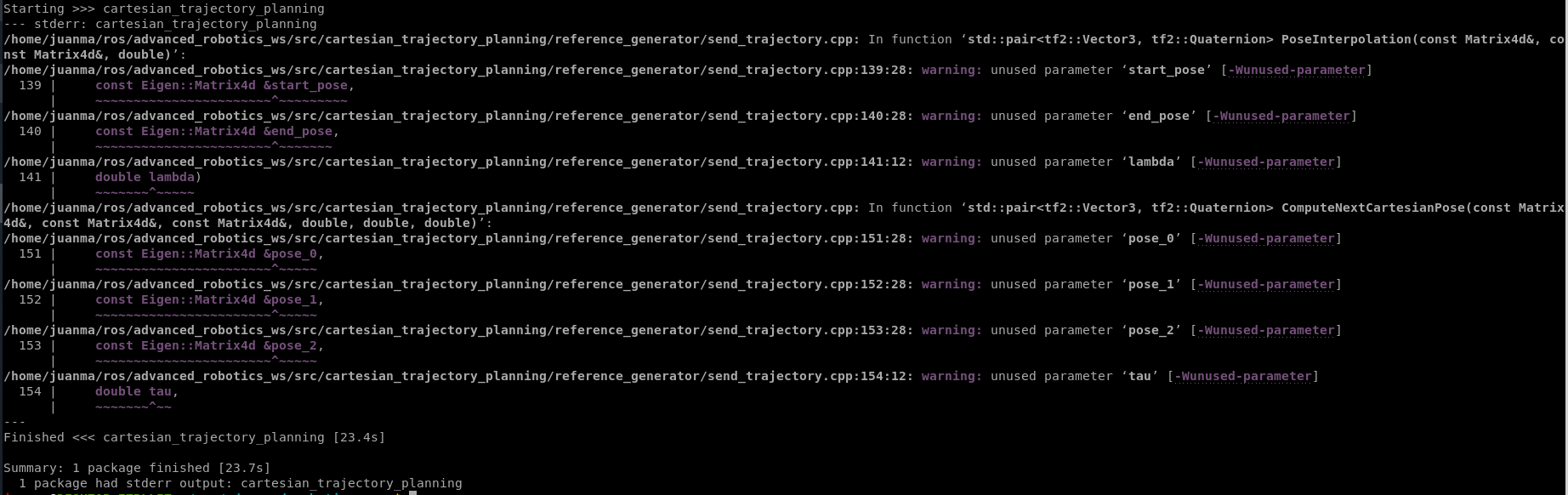
You should see something like this (don't worry about the warnings; they appear because the code is incomplete, and you'll complete it in this lab session).
3.3. Package content
It consists of the following:
- bringup: launch files and ros2_controller configuration
 You don't have to modify it.
 - config: poses.yaml file with the definition of the EE poses for the lab session
 You need to modify it in this lab.
 - controller: definition of the robot controller using ros2 control You don't have to modify it.
- description: the 6-DOF robot description (URDF and visualizer launch file) You don't have to modify it.
- experiment_data: you can use this folder to save and plot the data of the experiment You need to modify it in this lab.
- hardware: ros2_control hardware interface You don't have to modify it.
- reference_generator: It has 3 cpp files
- send_circular_trajectory.cpp: Example using a velocity controller with a circular trajectory. You don't have to modify it.
- send_linear_trajectory.cpp: Example using a velocity controller with a linear trajectory. You don't have to modify it.
- send_trajectory.cpp: This is the main file where you have to implement the Cartesian trajectory. You need to modify it in this lab.
- send_circular_trajectory.cpp: Example using a velocity controller with a circular trajectory.
The content of this package is inspired by and built on the ROS2 control example 7.
3.4. Test the demo
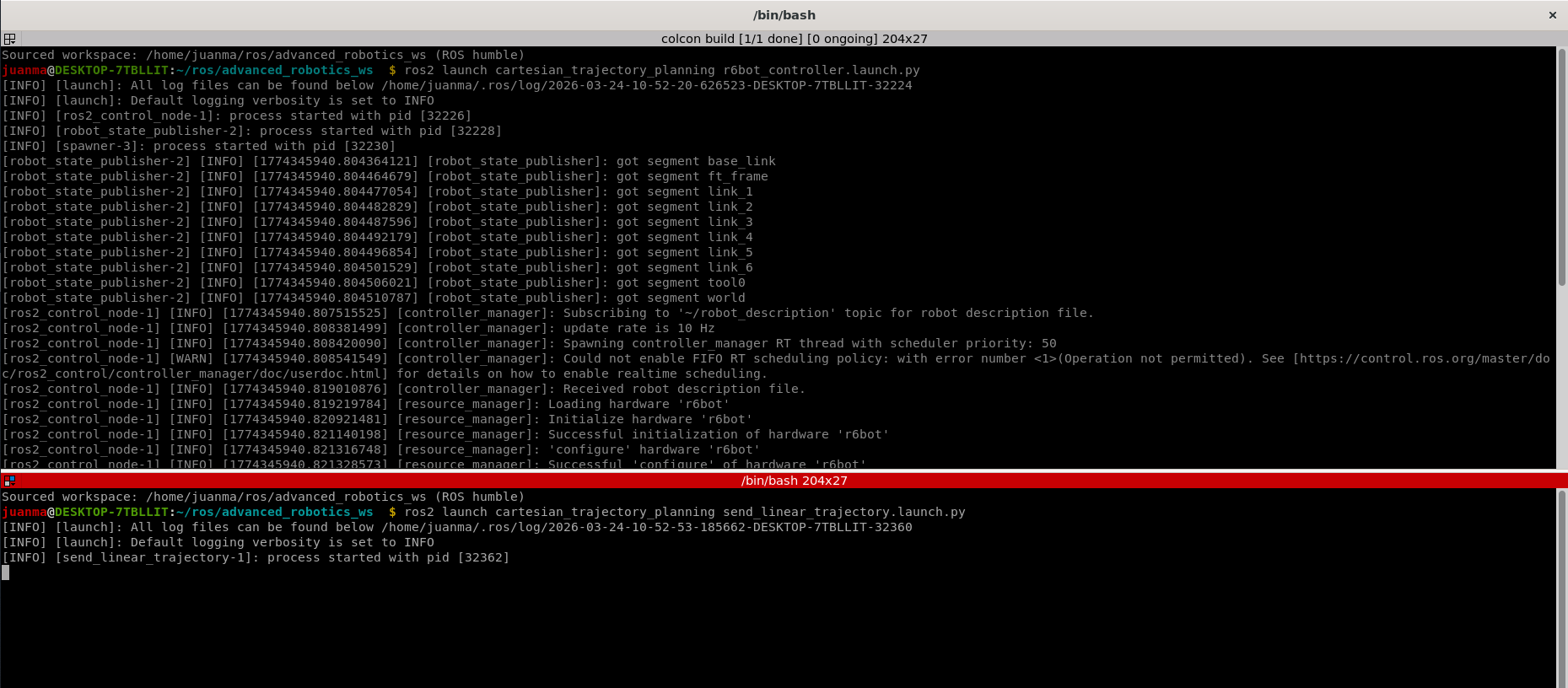
In one terminal, run:
In another terminal, run:
To show the EE trail in Rviz: * Go to RobotModel>Links>tool0 (or the link that refers to the EE). * Enable Show Trail.
You should see the following:
You can also try the circular trajectory if you want:
These trajectories are generated because the robot is under a joint velocity controller with an Inverse Kinematics solver (implemented using the ros2 control package - Described in Example 7).
Snippet of the velocity-based circular trajectory:
for (int i = 0; i < trajectory_len; i++)
  {
    // set endpoint twist
    double t = i;

    // circular trajectory in xy plane
    double vx = 2.0 * 0.3 * cos(2 * M_PI * t / trajectory_len);
    double vy = -0.3 * sin(2 * M_PI * t / trajectory_len);
    twist.vel.x(vx);
    twist.vel.y(vy);

    // convert cart to joint velocities
    ik_vel_solver_->CartToJnt(joint_positions, twist, joint_velocities);

    ...
  }
Snippet of the velocity-based linear trajectory:
for (int i = 0; i < trajectory_len; i++)
  {
    // set endpoint twist
    double t = i;
    // compute the desired linear x velocity once and set both x and y components
    double vx = 2.0 * 0.3 * cos(2 * M_PI * t / trajectory_len);
    twist.vel.x(vx);
    twist.vel.y(vx);

    // convert cart to joint velocities
    ik_vel_solver_->CartToJnt(joint_positions, twist, joint_velocities);

    ...
  }
However, in this lab you'll implement Cartesian interpolation with the robot under a joint position controller (using the same Inverse Kinematics solver already implemented with the Kinematics and Dynamics Library (KDL). If you're interested, other libraries can also do this (and much more), such as Pinocchio).
4. Understanding the code
4.1. send_trajectory.cpp
This script performs the complete interpolation during all proposed segments. Let's see the code (each part of the code is explained in detail below):
Show send_trajectory.cpp
// Author: Juan M. Gandarias
// email: jmgandarias@uma.es
// web: https://jmgandarias.com
//
// Inspired from the ros2_control Development Team demos

#include <kdl/chainfksolverpos_recursive.hpp>
#include <kdl/chainiksolverpos_nr.hpp>
#include <kdl/chainiksolvervel_pinv.hpp>
#include <kdl/jntarray.hpp>
#include <kdl/tree.hpp>
#include <kdl_parser/kdl_parser.hpp>
#include <ament_index_cpp/get_package_share_directory.hpp>
#include <rclcpp/rclcpp.hpp>
#include <trajectory_msgs/msg/joint_trajectory.hpp>
#include <trajectory_msgs/msg/joint_trajectory_point.hpp>
#include <Eigen/Dense>
#include <tf2/LinearMath/Transform.h>
#include <tf2/LinearMath/Matrix3x3.h>
#include <tf2/LinearMath/Quaternion.h>
#include <tf2/LinearMath/Vector3.h>
#include <yaml-cpp/yaml.h>

#include <fstream>
#include <iomanip>
#include <string>
#include <chrono>
#include <ctime>
#include <sstream>
#include <cerrno>
#include <cstring>
#include <sys/stat.h>
#include <sys/types.h>

Eigen::Matrix4d ParsePoseMatrix(const YAML::Node &root, const std::string &key)
{
    // This function parses a 4x4 matrix from a YAML node given a specific key word.
    if (!root[key] || !root[key].IsSequence() || root[key].size() != 4)
    {
        throw std::runtime_error("YAML key '" + key + "' must be a 4x4 matrix sequence");
    }

    Eigen::Matrix4d pose;
    for (int row = 0; row < 4; ++row)
    {
        const YAML::Node row_node = root[key][row];
        if (!row_node.IsSequence() || row_node.size() != 4)
        {
            throw std::runtime_error("YAML key '" + key + "' must contain rows of length 4");
        }
        for (int col = 0; col < 4; ++col)
        {
            pose(row, col) = row_node[col].as<double>();
        }
    }

    return pose;
}

tf2::Quaternion MuliplyQuaternions(const tf2::Quaternion &q1, const tf2::Quaternion &q2)
{
    // This function multiplies two quaternions q1 and q2 and returns the resulting quaternion.
    // The multiplication is defined as:
    // q_result = q1 * q2
    // where q1 and q2 are represented as (x, y, z, w) and the multiplication is performed using the Hamilton product.

    double x1 = q1.x();
    double y1 = q1.y();
    double z1 = q1.z();
    double w1 = q1.w();

    double x2 = q2.x();
    double y2 = q2.y();
    double z2 = q2.z();
    double w2 = q2.w();

    double x_result = w1 * x2 + x1 * w2 + y1 * z2 - z1 * y2;
    double y_result = w1 * y2 - x1 * z2 + y1 * w2 + z1 * x2;
    double z_result = w1 * z2 + x1 * y2 - y1 * x2 + z1 * w2;
    double w_result = w1 * w2 - x1 * x2 - y1 * y2 - z1 * z2;

    return tf2::Quaternion(x_result, y_result, z_result, w_result);
}

tf2::Quaternion InverseQuaternion(const tf2::Quaternion &q)
{
    // This function computes the inverse of a quaternion q and returns the resulting quaternion.
    // The inverse of a quaternion q = (x, y, z, w) is given by:
    // q_inv = (-x, -y, -z, w) / (x^2 + y^2 + z^2 + w^2)
    // where the numerator is the conjugate of the quaternion and the denominator is the norm squared of the quaternion.

    double x = q.x();
    double y = q.y();
    double z = q.z();
    double w = q.w();

    double norm = sqrt(x * x + y * y + z * z + w * w);

    if (norm == 0.0)
    {
        throw std::runtime_error("Cannot compute inverse of a zero-norm quaternion");
    }

    double x_inv = -x / norm;
    double y_inv = -y / norm;
    double z_inv = -z / norm;
    double w_inv = w / norm;

    return tf2::Quaternion(x_inv, y_inv, z_inv, w_inv);
}

tf2::Quaternion rot2Quat(const Eigen::Matrix3d &R, int m = 1)
{
    // This function converts a rotation matrix R to a quaternion representation.
    int M = (m >= 0) ? 1 : -1;
    double w = M * std::sqrt(R(0, 0) + R(1, 1) + R(2, 2) + 1.0) / 2.0;

    double x, y, z;

    if (std::abs(w) > 1e-3)
    {
        x = (R(2, 1) - R(1, 2)) / (4.0 * w);
        y = (R(0, 2) - R(2, 0)) / (4.0 * w);
        z = (R(1, 0) - R(0, 1)) / (4.0 * w);
    }
    else
    {
        w = 0.0;
        x = M * std::sqrt((R(0, 0) + 1.0) / 2.0);
        y = M * std::sqrt((R(1, 1) + 1.0) / 2.0);
        z = M * std::sqrt((R(2, 2) + 1.0) / 2.0);
    }

    return tf2::Quaternion(x, y, z, w);
}

// To be completed in Exercise 1
std::pair<tf2::Vector3, tf2::Quaternion> PoseInterpolation(
    const Eigen::Matrix4d &start_pose,
    const Eigen::Matrix4d &end_pose,
    double lambda)
{
    tf2::Vector3 p_interp;    // Placeholder for the interpolated position
    tf2::Quaternion q_interp; // Placeholder for the interpolated quaternion

    return {p_interp, q_interp};
}

// To be completed in Exercise 2
std::pair<tf2::Vector3, tf2::Quaternion> ComputeNextCartesianPose(
    const Eigen::Matrix4d &pose_0,
    const Eigen::Matrix4d &pose_1,
    const Eigen::Matrix4d &pose_2,
    double tau,
    double T,
    double t)
{
    // Check if t is within the valid range of [-T, T]
    if (t < -T || t > T)
    {
        throw std::out_of_range("Parameter t is outside [-T, T]");
    }

    const tf2::Vector3 p_interp; // Placeholder for the interpolated position
    tf2::Quaternion q_interp;    // Placeholder for the interpolated quaternion
    return {p_interp, q_interp};
}

int main(int argc, char **argv)
{
    rclcpp::init(argc, argv);
    auto node = std::make_shared<rclcpp::Node>("send_trajectory");
    auto pub = node->create_publisher<trajectory_msgs::msg::JointTrajectory>(
        "/r6bot_controller/joint_trajectory", 10);

    // get robot description
    auto robot_param = rclcpp::Parameter();
    node->declare_parameter("robot_description", rclcpp::ParameterType::PARAMETER_STRING);
    node->get_parameter("robot_description", robot_param);
    auto robot_description = robot_param.as_string();

    // create kinematic chain
    KDL::Tree robot_tree;
    KDL::Chain chain;
    kdl_parser::treeFromString(robot_description, robot_tree);
    robot_tree.getChain("base_link", "tool0", chain);

    auto joint_positions = KDL::JntArray(chain.getNrOfJoints());
    // create KDL solvers
    auto fk_solver_ = std::make_shared<KDL::ChainFkSolverPos_recursive>(chain);
    auto ik_vel_solver_ = std::make_shared<KDL::ChainIkSolverVel_pinv>(chain, 0.0000001);
    auto ik_pos_solver_ = std::make_shared<KDL::ChainIkSolverPos_NR>(
        chain, *fk_solver_, *ik_vel_solver_, 100, 1e-6);

    trajectory_msgs::msg::JointTrajectory trajectory_msg;
    trajectory_msg.header.stamp = node->now();
    for (size_t i = 0; i < chain.getNrOfSegments(); i++)
    {
        auto joint = chain.getSegment(i).getJoint();
        if (joint.getType() != KDL::Joint::Fixed)
        {
            trajectory_msg.joint_names.push_back(joint.getName());
        }
    }

    trajectory_msgs::msg::JointTrajectoryPoint trajectory_point_msg;
    trajectory_point_msg.positions.resize(chain.getNrOfJoints());
    trajectory_point_msg.velocities.resize(chain.getNrOfJoints());

    std::string poses_yaml_path;
    node->declare_parameter<std::string>("poses_yaml", "");
    node->get_parameter("poses_yaml", poses_yaml_path);

    if (poses_yaml_path.empty())
    {
        poses_yaml_path =
            ament_index_cpp::get_package_share_directory("cartesian_trajectory_planning") +
            "/config/poses.yaml";
    }

    Eigen::Matrix4d pose0;
    Eigen::Matrix4d pose1;
    Eigen::Matrix4d pose2;
    try
    {
        const YAML::Node poses_root = YAML::LoadFile(poses_yaml_path);
        pose0 = ParsePoseMatrix(poses_root, "pose0");
        pose1 = ParsePoseMatrix(poses_root, "pose1");
        pose2 = ParsePoseMatrix(poses_root, "pose2");
    }
    catch (const std::exception &e)
    {
        std::fprintf(stderr, "Failed to load poses YAML '%s': %s\n", poses_yaml_path.c_str(), e.what());
        return 1;
    }

    // Exercise 1 : Cartesian interpolation
    const auto [p0, q0] = PoseInterpolation(pose0, pose1, 0.0);
    const auto [p1, q1] = PoseInterpolation(pose0, pose1, 1.0);
    const auto [p2, q2] = PoseInterpolation(pose1, pose2, 0.0);
    const auto [p3, q3] = PoseInterpolation(pose1, pose2, 1.0);

    // Check the results of the interpolation
    printf("p0: %f, %f, %f\n", p0.x(), p0.y(), p0.z());
    printf("q0: %f, %f, %f, %f\n",
           q0.x(), q0.y(), q0.z(), q0.w());
    printf("p1: %f, %f, %f\n", p1.x(), p1.y(), p1.z());
    printf("q1: %f, %f, %f, %f\n",
           q1.x(), q1.y(), q1.z(), q1.w());
    printf("p2: %f, %f, %f\n", p2.x(), p2.y(), p2.z());
    printf("q2: %f, %f, %f, %f\n",
           q2.x(), q2.y(), q2.z(), q2.w());
    printf("p3: %f, %f, %f\n", p3.x(), p3.y(), p3.z());
    printf("q3: %f, %f, %f, %f\n",
           q3.x(), q3.y(), q3.z(), q3.w());

    // Exercise 2 : Cartesian trajectory generation
    int tau = 1;
    int T = 10;
    bool exercise_2 = false; // Set to true to execute Exercise 2

    if (exercise_2)
    {
        trajectory_msg.points.clear();
        const double sample_time = 0.1;
        int point_index = 0;

        const std::string package_name = "cartesian_trajectory_planning";
        const std::string package_share_dir =
            ament_index_cpp::get_package_share_directory(package_name);

        std::string output_base_dir = package_share_dir;
        const std::string install_suffix =
            "/install/" + package_name + "/share/" + package_name;
        const std::size_t suffix_pos = package_share_dir.rfind(install_suffix);
        if (suffix_pos != std::string::npos)
        {
            const std::string workspace_root = package_share_dir.substr(0, suffix_pos);
            const std::string source_candidate = workspace_root + "/src/" + package_name;

            struct stat source_candidate_stat;
            if (::stat(source_candidate.c_str(), &source_candidate_stat) == 0 &&
                S_ISDIR(source_candidate_stat.st_mode))
            {
                output_base_dir = source_candidate;
            }
        }

        const std::string output_dir = output_base_dir + "/experiment_data";

        if (::mkdir(output_dir.c_str(), 0755) != 0 && errno != EEXIST)
        {
            std::fprintf(stderr, "Failed to create output directory '%s': %s.\n", output_dir.c_str(), std::strerror(errno));
            return 1;
        }

        const auto now = std::chrono::system_clock::now();
        const std::time_t now_time_t = std::chrono::system_clock::to_time_t(now);
        std::tm local_tm;
        localtime_r(&now_time_t, &local_tm);

        std::ostringstream filename_builder;
        filename_builder << "data_" << std::put_time(&local_tm, "%Y%m%d_%H%M%S") << ".csv";
        const std::string output_csv = output_dir + "/" + filename_builder.str();
        std::ofstream csv_file(output_csv, std::ios::out | std::ios::trunc);
        if (!csv_file.is_open())
        {
            std::fprintf(stderr, "Failed to open CSV output file '%s'.\n", output_csv.c_str());
            return 1;
        }

        csv_file << "t,X,Y,Z,roll,pitch,yaw\n";
        csv_file << std::fixed << std::setprecision(9);

        // Loop over the time range from -T to T with a step of sample_time and compute the interpolated Cartesian pose at each time step
        for (double t = -T; t <= T + 1e-9; t += sample_time)
        {
            const auto [p_interp, q_interp] = ComputeNextCartesianPose(pose0, pose1, pose2, tau, T, t);

            double roll = 0.0;
            double pitch = 0.0;
            double yaw = 0.0;
            tf2::Matrix3x3(q_interp).getRPY(roll, pitch, yaw);

            csv_file << t << ","
                     << p_interp.x() << "," << p_interp.y() << "," << p_interp.z() << ","
                     << roll << "," << pitch << "," << yaw << "\n";

            const KDL::Frame desired_ee_pose(
                KDL::Rotation::Quaternion(q_interp.x(), q_interp.y(), q_interp.z(), q_interp.w()),
                KDL::Vector(p_interp.x(), p_interp.y(), p_interp.z()));

            KDL::JntArray next_joint_positions(chain.getNrOfJoints());
            const int ik_status = ik_pos_solver_->CartToJnt(joint_positions, desired_ee_pose, next_joint_positions);
            if (ik_status < 0)
            {
                std::fprintf(
                    stderr,
                    "IK failed at t=%.3f with error code %d. Skipping point.\n",
                    t, ik_status);
                continue;
            }

            std::memcpy(
                trajectory_point_msg.positions.data(), next_joint_positions.data.data(),
                trajectory_point_msg.positions.size() * sizeof(double));

            std::fill(trajectory_point_msg.velocities.begin(), trajectory_point_msg.velocities.end(), 0.0);

            const double elapsed = static_cast<double>(point_index + 1) * sample_time;
            trajectory_point_msg.time_from_start.sec = static_cast<int32_t>(elapsed);
            trajectory_point_msg.time_from_start.nanosec = static_cast<uint32_t>(
                (elapsed - static_cast<double>(trajectory_point_msg.time_from_start.sec)) * 1e9);

            trajectory_msg.points.push_back(trajectory_point_msg);
            joint_positions = next_joint_positions;
            point_index++;
        }

        if (trajectory_msg.points.empty())
        {
            std::fprintf(stderr, "No valid trajectory points were generated. Nothing will be published.\n");
            return 1;
        }

        while (pub->get_subscription_count() == 0 && rclcpp::ok())
        {
            std::fprintf(stderr, "Waiting for /r6bot_controller/joint_trajectory subscriber...\n");
            rclcpp::sleep_for(std::chrono::milliseconds(200));
        }

        trajectory_msg.header.stamp = node->now() + rclcpp::Duration::from_seconds(0.2);
        std::fprintf(stderr, "Publishing %zu trajectory points.\n", trajectory_msg.points.size());
        pub->publish(trajectory_msg);
        while (rclcpp::ok())
        {
            rclcpp::spin_some(node);
            rclcpp::sleep_for(std::chrono::milliseconds(50));
        }
    }

    return 0;
}
Warning
This repo is under development and keeps improving. To check the latest version, visit the github repo.
4.2. Code parts explained
-
Eigen::Matrix4d ParsePoseMatrix(const YAML::Node &root, const std::string &key):¶This function parses a 4x4 matrix from a YAML file given a specific keyword. It is used in the code to parse the pose matrices defined in
config/poses.yaml.Show ParsePoseMatrix
ParsePoseMatrix.cppEigen::Matrix4d ParsePoseMatrix(const YAML::Node &root, const std::string &key) { // This function parses a 4x4 matrix from a YAML node given a specific key word. if (!root[key] || !root[key].IsSequence() || root[key].size() != 4) { throw std::runtime_error("YAML key '" + key + "' must be a 4x4 matrix sequence"); } Eigen::Matrix4d pose; for (int row = 0; row < 4; ++row) { const YAML::Node row_node = root[key][row]; if (!row_node.IsSequence() || row_node.size() != 4) { throw std::runtime_error("YAML key '" + key + "' must contain rows of length 4"); } for (int col = 0; col < 4; ++col) { pose(row, col) = row_node[col].as<double>(); } } return pose; }Info
In the course you'll use the
Eigenlibrary to work with linear algebra (matrices, vectors, etc) in C++. In this part of the code you are defining the objectposefrom theMatrixclass.Info
In the course you'll use
YAML files. -
tf2::Quaternion MuliplyQuaternions(const tf2::Quaternion &q1, const tf2::Quaternion &q2):¶This function multiplies two quaternions q1 and q2 and returns the resulting quaternion. The multiplication is defined as: \(q_{result} = q_1 * q_2\), where \(q_1\) and \(q_2\) are represented as \((x, y, z, w)\) and the product is performed using the Hamilton product.
Show MuliplyQuaternions
MuliplyQuaternions.cpptf2::Quaternion MuliplyQuaternions(const tf2::Quaternion &q1, const tf2::Quaternion &q2) { // This function multiplies two quaternions q1 and q2 and returns the resulting quaternion. // The multiplication is defined as: // q_result = q1 * q2 // where q1 and q2 are represented as (x, y, z, w) and the multiplication is performed using the Hamilton product. double x1 = q1.x(); double y1 = q1.y(); double z1 = q1.z(); double w1 = q1.w(); double x2 = q2.x(); double y2 = q2.y(); double z2 = q2.z(); double w2 = q2.w(); double x_result = w1 * x2 + x1 * w2 + y1 * z2 - z1 * y2; double y_result = w1 * y2 - x1 * z2 + y1 * w2 + z1 * x2; double z_result = w1 * z2 + x1 * y2 - y1 * x2 + z1 * w2; double w_result = w1 * w2 - x1 * x2 - y1 * y2 - z1 * z2; return tf2::Quaternion(x_result, y_result, z_result, w_result); }Info
In the course you'll use the
tf2package to work with coordinate frames and take advantage of useful classes and methods. In this part of the code you are using the classQuaternion. -
tf2::Quaternion InverseQuaternion(const tf2::Quaternion &q):¶This function computes the inverse of a quaternion \(q\) and returns the resulting quaternion.
Show InverseQuaternion
InverseQuaternion.cpptf2::Quaternion InverseQuaternion(const tf2::Quaternion &q) { // This function computes the inverse of a quaternion q and returns the resulting quaternion. // The inverse of a quaternion q = (x, y, z, w) is given by: // q_inv = (-x, -y, -z, w) / (x^2 + y^2 + z^2 + w^2) // where the numerator is the conjugate of the quaternion and the denominator is the norm squared of the quaternion. double x = q.x(); double y = q.y(); double z = q.z(); double w = q.w(); double norm = sqrt(x * x + y * y + z * z + w * w); if (norm == 0.0) { throw std::runtime_error("Cannot compute inverse of a zero-norm quaternion"); } double x_inv = -x / norm; double y_inv = -y / norm; double z_inv = -z / norm; double w_inv = w / norm; return tf2::Quaternion(x_inv, y_inv, z_inv, w_inv); } -
tf2::Quaternion rot2Quat(const Eigen::Matrix3d &R, int m = 1):¶This function converts a rotation matrix R to a quaternion representation.
Show rot2Quat
rot2Quat.cpptf2::Quaternion rot2Quat(const Eigen::Matrix3d &R, int m = 1) { // This function converts a rotation matrix R to a quaternion representation. int M = (m >= 0) ? 1 : -1; double w = M * std::sqrt(R(0, 0) + R(1, 1) + R(2, 2) + 1.0) / 2.0; double x, y, z; if (std::abs(w) > 1e-3) { x = (R(2, 1) - R(1, 2)) / (4.0 * w); y = (R(0, 2) - R(2, 0)) / (4.0 * w); z = (R(1, 0) - R(0, 1)) / (4.0 * w); } else { w = 0.0; x = M * std::sqrt((R(0, 0) + 1.0) / 2.0); y = M * std::sqrt((R(1, 1) + 1.0) / 2.0); z = M * std::sqrt((R(2, 2) + 1.0) / 2.0); } return tf2::Quaternion(x, y, z, w); } -
std::pair<tf2::Vector3, tf2::Quaternion> PoseInterpolation(const Eigen::Matrix4d &start_pose, const Eigen::Matrix4d &end_pose, double lambda):¶You must implement this function in the Exercise 1.
This function interpolates between two poses (
start_poseandend_pose) based on the interpolation parameterlambda\((\lambda \in [0, 1])\). It returns a pair containing the interpolated position (tf2::Vector3) and orientation (tf2::Quaternion).PoseInterpolation.cpp// To be completed in Exercise 1 std::pair<tf2::Vector3, tf2::Quaternion> PoseInterpolation( const Eigen::Matrix4d &start_pose, const Eigen::Matrix4d &end_pose, double lambda) { tf2::Vector3 p_interp; // Placeholder for the interpolated position tf2::Quaternion q_interp; // Placeholder for the interpolated quaternion return {p_interp, q_interp}; }Tip
When computing the relative quaternion \(\mathbf{q}_{C}\) between two orientations \(\mathbf{q}_A\) and \(\mathbf{q}_B\), you should check that it is less than \(180^\circ\) to ensure that you're taking the shortest path:
\[ \mathbf{q}_{C} = \mathbf{q}_A^{-1} * \mathbf{q}_B \] -
std::pair<tf2::Vector3, tf2::Quaternion> ComputeNextCartesianPose(const Eigen::Matrix4d &pose_0, const Eigen::Matrix4d &pose_1, const Eigen::Matrix4d &pose_2, double tau, double T, double t):¶You must implement this function in the Exercise 2
ComputeNextCartesianPose.cpp// To be completed in Exercise 2 std::pair<tf2::Vector3, tf2::Quaternion> ComputeNextCartesianPose( const Eigen::Matrix4d &pose_0, const Eigen::Matrix4d &pose_1, const Eigen::Matrix4d &pose_2, double tau, double T, double t) { // Check if t is within the valid range of [-T, T] if (t < -T || t > T) { throw std::out_of_range("Parameter t is outside [-T, T]"); } const tf2::Vector3 p_interp; // Placeholder for the interpolated position tf2::Quaternion q_interp; // Placeholder for the interpolated quaternion return {p_interp, q_interp}; } -
int main(int argc, char **argv)- First part:¶The first part of
mainincludes the code needed to run the application, which you do not need to change. It initializes the node and publisher, gets the robot description, creates the kinematic chain and solvers using KDL, creates the ROS 2 joint trajectory message that will later be filled with the points you'll calculate, and gets the poses (pose0, pose1, pose2) fromconfig/poses.yaml.Show int main(int argc, char **argv)
main.cppint main(int argc, char **argv) { rclcpp::init(argc, argv); auto node = std::make_shared<rclcpp::Node>("send_trajectory"); auto pub = node->create_publisher<trajectory_msgs::msg::JointTrajectory>( "/r6bot_controller/joint_trajectory", 10); // get robot description auto robot_param = rclcpp::Parameter(); node->declare_parameter("robot_description", rclcpp::ParameterType::PARAMETER_STRING); node->get_parameter("robot_description", robot_param); auto robot_description = robot_param.as_string(); // create kinematic chain KDL::Tree robot_tree; KDL::Chain chain; kdl_parser::treeFromString(robot_description, robot_tree); robot_tree.getChain("base_link", "tool0", chain); auto joint_positions = KDL::JntArray(chain.getNrOfJoints()); // create KDL solvers auto fk_solver_ = std::make_shared<KDL::ChainFkSolverPos_recursive>(chain); auto ik_vel_solver_ = std::make_shared<KDL::ChainIkSolverVel_pinv>(chain, 0.0000001); auto ik_pos_solver_ = std::make_shared<KDL::ChainIkSolverPos_NR>( chain, *fk_solver_, *ik_vel_solver_, 100, 1e-6); trajectory_msgs::msg::JointTrajectory trajectory_msg; trajectory_msg.header.stamp = node->now(); for (size_t i = 0; i < chain.getNrOfSegments(); i++) { auto joint = chain.getSegment(i).getJoint(); if (joint.getType() != KDL::Joint::Fixed) { trajectory_msg.joint_names.push_back(joint.getName()); } } trajectory_msgs::msg::JointTrajectoryPoint trajectory_point_msg; trajectory_point_msg.positions.resize(chain.getNrOfJoints()); trajectory_point_msg.velocities.resize(chain.getNrOfJoints()); std::string poses_yaml_path; node->declare_parameter<std::string>("poses_yaml", ""); node->get_parameter("poses_yaml", poses_yaml_path); if (poses_yaml_path.empty()) { poses_yaml_path = ament_index_cpp::get_package_share_directory("cartesian_trajectory_planning") + "/config/poses.yaml"; } Eigen::Matrix4d pose0; Eigen::Matrix4d pose1; Eigen::Matrix4d pose2; try { const YAML::Node poses_root = YAML::LoadFile(poses_yaml_path); pose0 = ParsePoseMatrix(poses_root, "pose0"); pose1 = ParsePoseMatrix(poses_root, "pose1"); pose2 = ParsePoseMatrix(poses_root, "pose2"); } catch (const std::exception &e) { std::fprintf(stderr, "Failed to load poses YAML '%s': %s\n", poses_yaml_path.c_str(), e.what()); return 1; } -
Cartesian interpolation
:¶This block runs the Exercise 1 code and checks your interpolation function. It calls
PoseInterpolationat the endpoints of two segments: * pose0 -> pose1 with \(\lambda = 0\) and \(\lambda = 1\) * pose1 -> pose2 with \(\lambda = 0\) and \(\lambda = 1\)It stores each result as position (p) and orientation quaternion (q) and prints all four positions and quaternions to verify correctness. What you should expect if
PoseInterpolationis implemented properly:p0, q0should match pose0p1, q1should match pose1p2, q2should also match pose1 (start of second segment)p3, q3should match pose2
So this code does not generate the trajectory yet; it just validates that interpolation gives the correct boundary poses.
exercise1.cpp// Exercise 1 : Cartesian interpolation const auto [p0, q0] = PoseInterpolation(pose0, pose1, 0.0); const auto [p1, q1] = PoseInterpolation(pose0, pose1, 1.0); const auto [p2, q2] = PoseInterpolation(pose1, pose2, 0.0); const auto [p3, q3] = PoseInterpolation(pose1, pose2, 1.0); // Check the results of the interpolation printf("p0: %f, %f, %f\n", p0.x(), p0.y(), p0.z()); printf("q0: %f, %f, %f, %f\n", q0.x(), q0.y(), q0.z(), q0.w()); printf("p1: %f, %f, %f\n", p1.x(), p1.y(), p1.z()); printf("q1: %f, %f, %f, %f\n", q1.x(), q1.y(), q1.z(), q1.w()); printf("p2: %f, %f, %f\n", p2.x(), p2.y(), p2.z()); printf("q2: %f, %f, %f, %f\n", q2.x(), q2.y(), q2.z(), q2.w()); printf("p3: %f, %f, %f\n", p3.x(), p3.y(), p3.z()); printf("q3: %f, %f, %f, %f\n", q3.x(), q3.y(), q3.z(), q3.w()); -
Smooth trajectory generation. Configuration
:¶This block is the first part of the code needed for the Exercise 2. It is disabled by default. You have to set the variable
exercise_2 = trueonce you've finished Exercise 1. It defines \(\tau = 1\) and \(T = 10\) as trajectory timing parameters. If enabled, trajectory generation runs. -
Exercise 2: Smooth trajectory generation. Initialization
:¶This block is the second part of the code needed for the Exercise 2. If enabled, it initializes trajectory generation state:
- Clears previous points from trajectory_msg.
- Sets sampling period sample_time = 0.1 s.
- Initializes
point_indexfor time stamps. - It resolves where to save experiment data: a .csv file in the folder experiment_data.
This part is mostly preparation: configure run parameters, choose output location, and prepare a CSV logger before the actual trajectory loop starts. Important detail: with
exercise_2 = false, none of this executes.Show Exercise 2, part 2
exercise2_part2.cppif (exercise_2) { trajectory_msg.points.clear(); const double sample_time = 0.1; int point_index = 0; const std::string package_name = "cartesian_trajectory_planning"; const std::string package_share_dir = ament_index_cpp::get_package_share_directory(package_name); std::string output_base_dir = package_share_dir; const std::string install_suffix = "/install/" + package_name + "/share/" + package_name; const std::size_t suffix_pos = package_share_dir.rfind(install_suffix); if (suffix_pos != std::string::npos) { const std::string workspace_root = package_share_dir.substr(0, suffix_pos); const std::string source_candidate = workspace_root + "/src/" + package_name; struct stat source_candidate_stat; if (::stat(source_candidate.c_str(), &source_candidate_stat) == 0 && S_ISDIR(source_candidate_stat.st_mode)) { output_base_dir = source_candidate; } } const std::string output_dir = output_base_dir + "/experiment_data"; if (::mkdir(output_dir.c_str(), 0755) != 0 && errno != EEXIST) { std::fprintf(stderr, "Failed to create output directory '%s': %s.\n", output_dir.c_str(), std::strerror(errno)); return 1; } const auto now = std::chrono::system_clock::now(); const std::time_t now_time_t = std::chrono::system_clock::to_time_t(now); std::tm local_tm; localtime_r(&now_time_t, &local_tm); std::ostringstream filename_builder; filename_builder << "data_" << std::put_time(&local_tm, "%Y%m%d_%H%M%S") << ".csv"; const std::string output_csv = output_dir + "/" + filename_builder.str(); std::ofstream csv_file(output_csv, std::ios::out | std::ios::trunc); if (!csv_file.is_open()) { std::fprintf(stderr, "Failed to open CSV output file '%s'.\n", output_csv.c_str()); return 1; } csv_file << "t,X,Y,Z,roll,pitch,yaw\n"; csv_file << std::fixed << std::setprecision(9); -
Exercise 2: Smooth trajectory generation. Time loop
:¶This block is the third part of the code needed for the Exercise 2. This loop is the core trajectory sampler: for each time step, it computes one Cartesian pose, converts it to joint space, and appends one trajectory point.
- The loop iterates from \(t= −T\) to \(t=T\) in steps of
sample_time. - In every step, it calls
ComputeNextCartesianPose(that you need to implement in Exercise 2) to get the interpolated positionp_interpand orientation quaternionq_interpat time t. - It also logs the data for analysis: Converts quaternion to roll/pitch/yaw, and writes t, X, Y, Z, roll, pitch, yaw of every trajectory point to the CSV file.
- Packs
p_interpandq_interpinto aKDL::Frame (desired_ee_pose)for the end-effector. Then, it solves IK from currentjoint_positionstodesired_ee_pose. If IK fails, prints an error and skips that time sample (continue). - It copies solved joint angles into
trajectory_point_msg.positionsand pushes the point intotrajectory_msg.points. - Updates
joint_positionswith the solved values so next IK step starts near the previous one (improves continuity/convergence).
So in short: Cartesian path sample -> IK -> trajectory point, repeated until the whole ROS joint trajectory is built.
Show Exercise 2, part 3
exercise2_part3.cpp// Loop over the time range from -T to T with a step of sample_time and compute the interpolated Cartesian pose at each time step for (double t = -T; t <= T + 1e-9; t += sample_time) { const auto [p_interp, q_interp] = ComputeNextCartesianPose(pose0, pose1, pose2, tau, T, t); double roll = 0.0; double pitch = 0.0; double yaw = 0.0; tf2::Matrix3x3(q_interp).getRPY(roll, pitch, yaw); csv_file << t << "," << p_interp.x() << "," << p_interp.y() << "," << p_interp.z() << "," << roll << "," << pitch << "," << yaw << "\n"; const KDL::Frame desired_ee_pose( KDL::Rotation::Quaternion(q_interp.x(), q_interp.y(), q_interp.z(), q_interp.w()), KDL::Vector(p_interp.x(), p_interp.y(), p_interp.z())); KDL::JntArray next_joint_positions(chain.getNrOfJoints()); const int ik_status = ik_pos_solver_->CartToJnt(joint_positions, desired_ee_pose, next_joint_positions); if (ik_status < 0) { std::fprintf( stderr, "IK failed at t=%.3f with error code %d. Skipping point.\n", t, ik_status); continue; } std::memcpy( trajectory_point_msg.positions.data(), next_joint_positions.data.data(), trajectory_point_msg.positions.size() * sizeof(double)); std::fill(trajectory_point_msg.velocities.begin(), trajectory_point_msg.velocities.end(), 0.0); const double elapsed = static_cast<double>(point_index + 1) * sample_time; trajectory_point_msg.time_from_start.sec = static_cast<int32_t>(elapsed); trajectory_point_msg.time_from_start.nanosec = static_cast<uint32_t>( (elapsed - static_cast<double>(trajectory_point_msg.time_from_start.sec)) * 1e9); trajectory_msg.points.push_back(trajectory_point_msg); joint_positions = next_joint_positions; point_index++; } - The loop iterates from \(t= −T\) to \(t=T\) in steps of
-
End of the program
:¶This is the publish-and-wait tail of the node.
- Safety check: If no trajectory points were generated, it prints an error and exits with code 1.
- Wait for a subscriber: It loops until something subscribes to
/r6bot_controller/joint_trajectory. While waiting, it logs a message and sleeps 200 ms to avoid busy-waiting. - It sets the trajectory header stamp to “now + 0.2 s”. That small delay gives the controller a little lead time before execution starts.
- It logs how many points will be sent, then publishes the full trajectory message.
- It enters a loop while ROS is running. This keeps the process alive (instead of exiting immediately after publishing).
So this section ensures the message is valid to send, waits for a listener, publishes once with a future start time, and then keeps the node running.
Show End of the code
end_of_code.cppif (trajectory_msg.points.empty()) { std::fprintf(stderr, "No valid trajectory points were generated. Nothing will be published.\n"); return 1; } while (pub->get_subscription_count() == 0 && rclcpp::ok()) { std::fprintf(stderr, "Waiting for /r6bot_controller/joint_trajectory subscriber...\n"); rclcpp::sleep_for(std::chrono::milliseconds(200)); } trajectory_msg.header.stamp = node->now() + rclcpp::Duration::from_seconds(0.2); std::fprintf(stderr, "Publishing %zu trajectory points.\n", trajectory_msg.points.size()); pub->publish(trajectory_msg); while (rclcpp::ok()) { rclcpp::spin_some(node); rclcpp::sleep_for(std::chrono::milliseconds(50)); } } return 0; }
5. Exercises
Considering all the above, and the following values for \(\mathbf{P}_0, \mathbf{P}_1, \mathbf{P}_2\), the following exercises are requested:
5.1. Exercise 1: Cartesian interpolation
Define the pose interpolation function based on the Taylor method in std::pair<tf2::Vector3, tf2::Quaternion> PoseInterpolation(...). This function should perform a linear interpolation of the position and a slerp of the orientation between start_pose and end_pose. Hence, the function must return the intermediate position p_interp and intermediate quaternion q_interp based on lambda (knowing that \(\lambda \in [0, 1]\)).
With the code in the Cartesian interpolation block, you can run Exercise 1 and verify whether your Cartesian interpolation implementation is correct.
5.1.1. Expected results
When launching the script, you should see the following results:
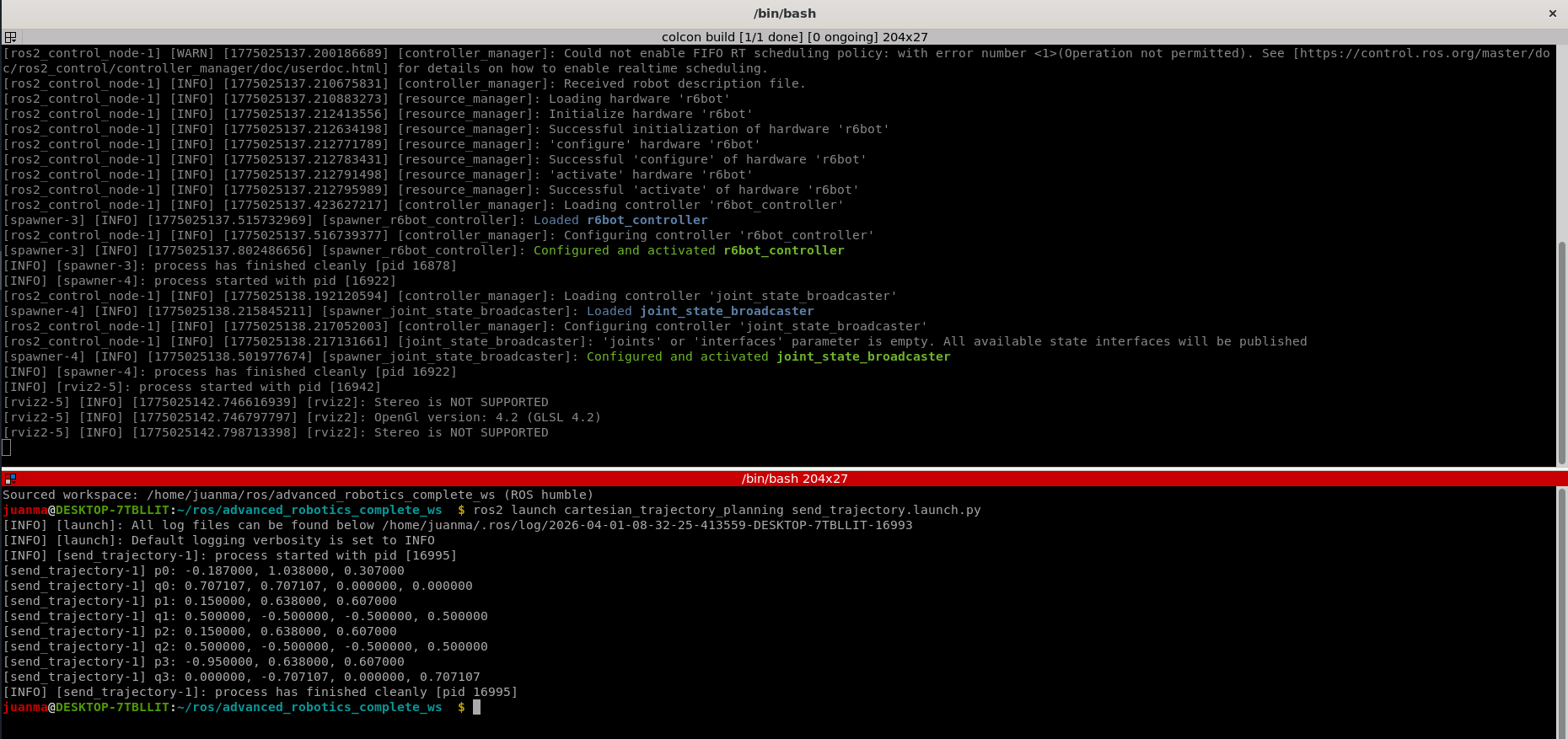
You can check that the values [p_interp, q_interp] returned by PoseInterpolation(pose0, pose1, lambda); match the values of \(\mathbf{P}_0\), \(\mathbf{P}_1\), and \(\mathbf{P}_2\), depending on which poses and lambda values you pass to the function.
Hence, if implemented correctly, you should get the following:
[send_trajectory-1] p0: -0.187000, 1.038000, 0.307000
[send_trajectory-1] q0: 0.707107, 0.707107, 0.000000, 0.000000
[send_trajectory-1] p1: 0.150000, 0.638000, 0.607000
[send_trajectory-1] q1: 0.500000, -0.500000, -0.500000, 0.500000
[send_trajectory-1] p2: 0.150000, 0.638000, 0.607000
[send_trajectory-1] q2: 0.500000, -0.500000, -0.500000, 0.500000
[send_trajectory-1] p3: -0.950000, 0.638000, 0.607000
[send_trajectory-1] q3: 0.000000, -0.707107, 0.000000, 0.707107
Tip
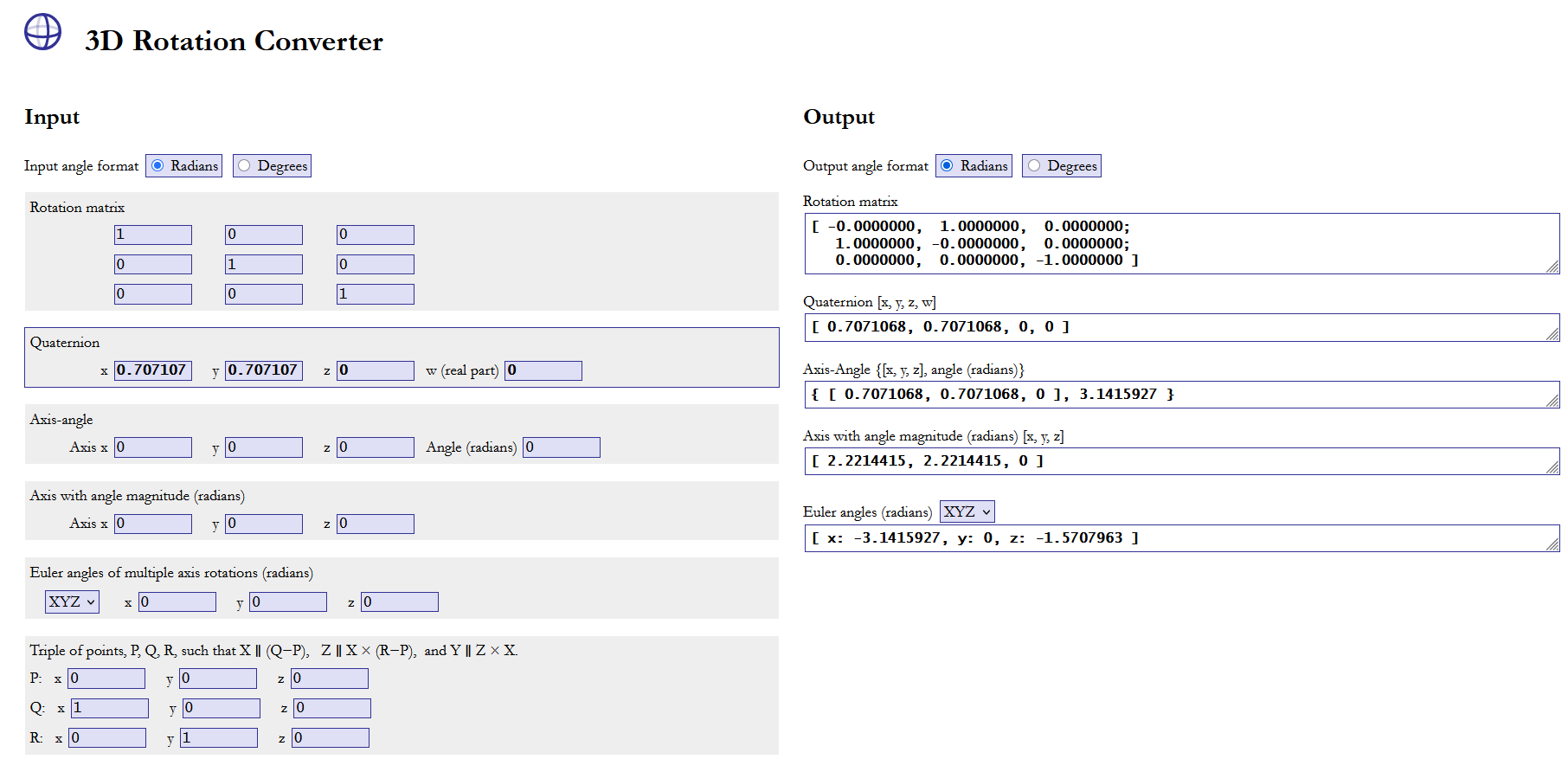
You can easily check the quaternion-rotation match using the 3D Rotation Converter
Example with q_0:
5.2. Exercise 2: Smooth trajectory generation
To carry out this exercise, first you need to set the boolean variable exercise_2 in int main() to true:
You must also define the ComputeNextCartesianPose function. This function is called inside the trajectory loop and returns the corresponding pose (position: tf2::Vector3 p_interp; orientation: tf2::Quaternion q_interp) for the movement from \(\mathbf{P}_0\) (pose0) to \(\mathbf{P}_2\) (pose2) via \(\mathbf{P}_1\) (pose1), smoothed by the Taylor method at each timestep t. The parameters \(\tau\) and \(T\) correspond to the transition interval and total traversal time shown in Figure 1.
Question
- What happens when you change the value of \(\tau\)?
- What happens when you change the value of \(T\)?
- Can you change the velovity of the robot? How?
5.2.1. Graphical representation
Once the exercise is done, the data of the experiment is saved in the folder YOUR_ROS_ws/src/cartesian_trajectory_planning/experiment_data.
The data is saved in a .csv file as a table with the following information: t, X, Y, Z, roll, pitch, yaw. This allows you to plot the position and orientation of the robot EE. The data is saved with the following naming format: data_YearMonthDay_HourMinuteSecond, making it easy to find the experiment you want to plot.
You can use the Python script plot_data.py in that folder to plot the data easily. If you run:
This command plots the latest saved experiment. If you want to specify the experiment to plot, you can use:
Alternatively, you can load the .csv with any other software that allows you to manipulate and plot data, such as MATLAB.
5.2.2. Expected results
The expected result of the complete exercise is illustrated in the following video and figures:
Video 1. Expected result of the lab session.
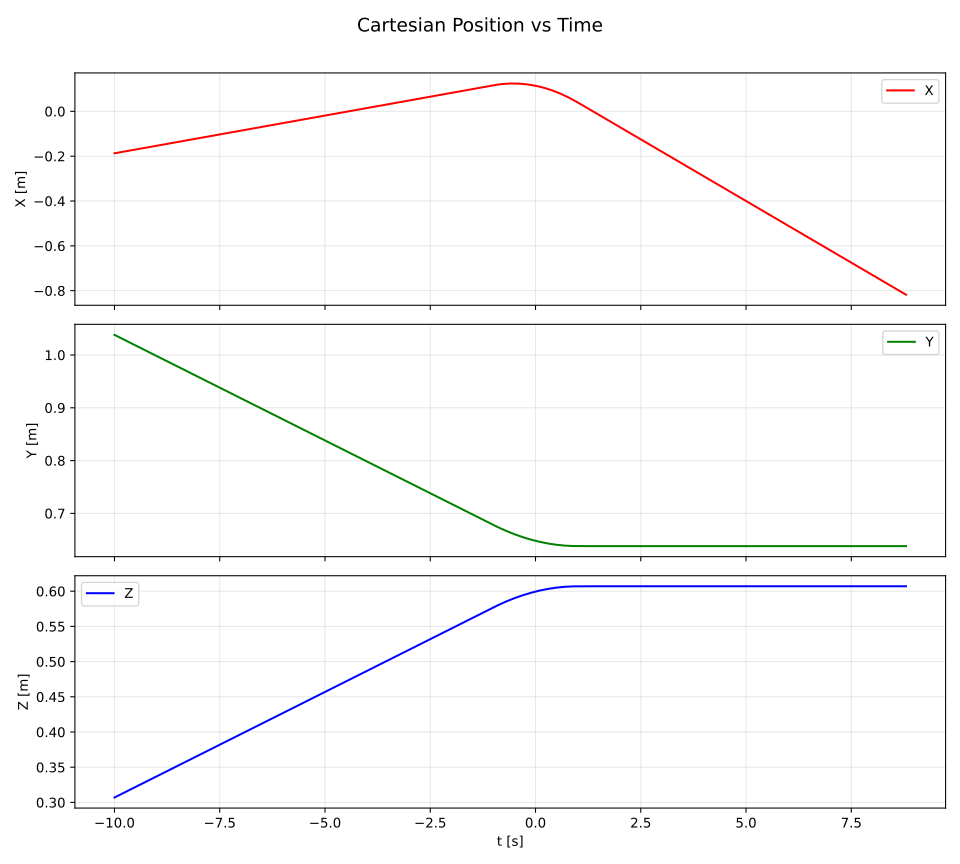
Figure 2. Position trajectories.
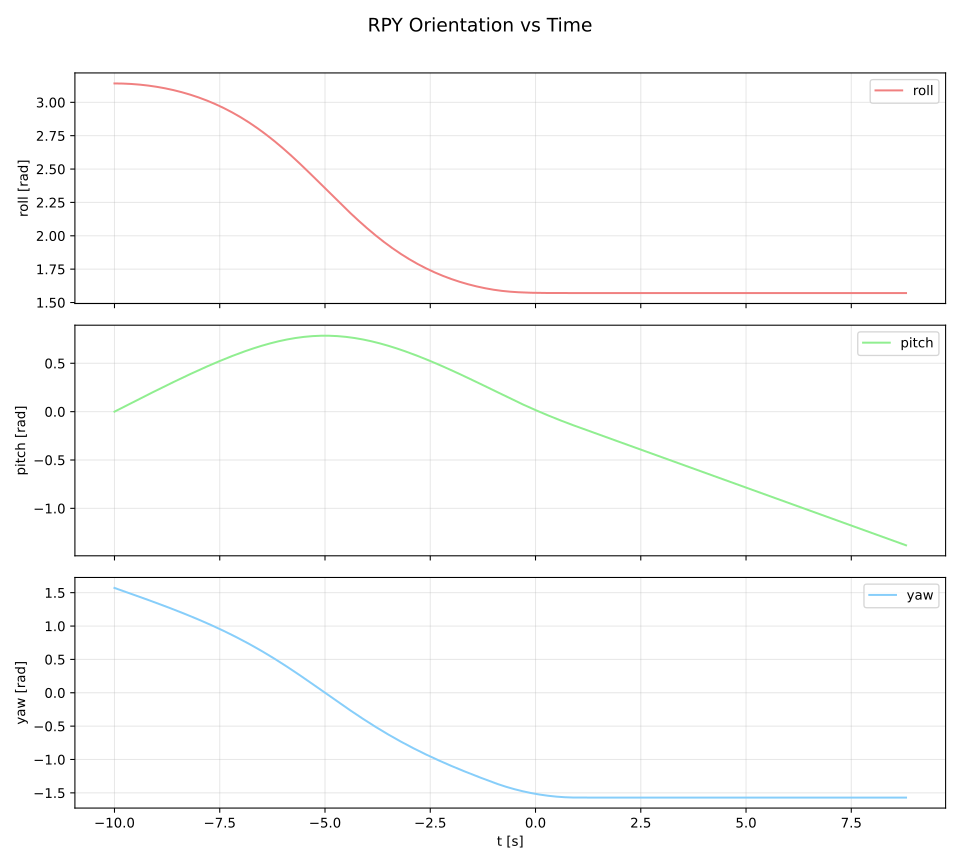
Figure 3. Orientation trajectories.
6. Extra (optional)
Once both exercises of this lab session are completed, the following modifications are proposed as an extra exercise for those who want to deepen their understanding of the concepts.
6.1. Differences between our slerp and the one in tf2
What are the differences between the slerp method implemented in Exercise 1 and the one defined in tf2?
6.2. Pick & Place
Modify the exercise code to perform a pick & place task. To do so, you will need to make the following modifications:
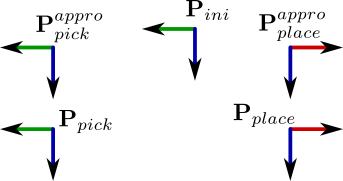
- The application must include the points \(\mathbf{P}_{pick}\) and \(\mathbf{P}_{place}\) for picking and placing, respectively, as well as two approach points above each of them at a given distance measured along the Z axis (\(\mathbf{P}_{pick}^{appro}\) and \(\mathbf{P}_{place}^{appro}\)). In addition, the application will include the initial point where the EE starts, \(\mathbf{P}_{ini}\) (which should be the same as \(\mathbf{P}_{0}\)).
- Assume that the EE starts at point \(\mathbf{P}_{pick}^{appro}\).
- The sequence of movements to be performed shall be:
- Move from \(\mathbf{P}_{ini}\) to \(\mathbf{P}_{pick}\) passing through \(\mathbf{P}_{pick}^{appro}\) with smoothing.
- Move from \(\mathbf{P}_{pick}\) to \(\mathbf{P}_{ini}\) passing through \(\mathbf{P}_{pick}^{appro}\) with smoothing.
- Move from \(\mathbf{P}_{ini}\) to \(\mathbf{P}_{place}\) passing through \(\mathbf{P}_{place}^{appro}\) with smoothing.
- Move from \(\mathbf{P}_{place}\) to \(\mathbf{P}_{ini}\) passing through \(\mathbf{P}_{place}^{appro}\) with smoothing.
The figure below illustrates the requested motion. Note the change in orientation at the place points.