Lab Session 3: Inverse Dynamics Control
In this lab session, you will learn how to implement inverse dynamics controllers to compensate for the non-linear dynamics of the manipulator, allowing you to impose a specific desired dynamic behavior. Note that you are expected to have finished the previous lab session, as you will need that implementation.
3.1. Gravity compensation
3.1.1. Implementation
As you may have noticed in the previous lab, gravitational effects on the manipulator make it "fall." Therefore, our controller should include these effects when computing the joint torques commanded to the actuators. The simplest inverse dynamics controller is the gravity compensation controller, which sets the actuator torques equal to those produced by gravity.
To implement the gravity compensation controller you need to do the following:
-
Create the gravity compensation node:
gravity_compensation.cppShow the code
gravity_compensation.cpp/* Author: Juan M. Gandarias (http://jmgandarias.com) email: jmgandarias@uma.es This script calculates the torque to cancellate the gracvity dynamic effects tau = g(q) Inputs: desired_joint_accelerations, joint_state(joint_positions, joint_velocities) Output: joint_torques */ #include <rclcpp/rclcpp.hpp> #include <sensor_msgs/msg/joint_state.hpp> #include <std_msgs/msg/float64_multi_array.hpp> #include <chrono> #include <Eigen/Dense> #include <cmath> class DynamicsCancellationNode : public rclcpp::Node { public: DynamicsCancellationNode() : Node("gravity_compensation_node"), joint_positions_(Eigen::VectorXd::Zero(2)), joint_torques_(Eigen::VectorXd::Zero(2)) { // Frequency initialization this->declare_parameter<double>("frequency", 1000.0); // Dynamics parameters initialization this->declare_parameter<double>("m2", 1.0); this->declare_parameter<double>("m1", 1.0); this->declare_parameter<double>("l1", 1.0); this->declare_parameter<double>("l2", 1.0); this->declare_parameter<double>("b1", 1.0); this->declare_parameter<double>("b2", 1.0); this->declare_parameter<double>("g", 9.81); this->declare_parameter<std::vector<double>>("q0", {0, 0}); // Get frequency [Hz] parameter and compute period [s] double frequency = this->get_parameter("frequency").as_double(); // Get dynamic parameters m1_ = this->get_parameter("m1").as_double(); m2_ = this->get_parameter("m2").as_double(); l1_ = this->get_parameter("l1").as_double(); l2_ = this->get_parameter("l2").as_double(); g_ = this->get_parameter("g").as_double(); b1_ = this->get_parameter("b1").as_double(); b2_ = this->get_parameter("b2").as_double(); // Set initial joint state joint_positions_ = Eigen::VectorXd::Map(this->get_parameter("q0").as_double_array().data(), 2); // Create subscription to joint_torques subscription_joint_states_ = this->create_subscription<sensor_msgs::msg::JointState>( "joint_states", 1, std::bind(&DynamicsCancellationNode::joint_states_callback, this, std::placeholders::_1)); // Create publishers for joint torque publisher_joint_torques_ = this->create_publisher<std_msgs::msg::Float64MultiArray>("joint_torques", 1); // Set the timer callback at a period (in milliseconds, multiply it by 1000) timer_ = this->create_wall_timer( std::chrono::milliseconds(static_cast<int>(1000 / frequency)), std::bind(&DynamicsCancellationNode::timer_callback, this)); } // Timer callback - when there is a timer callback, computes the new joint acceleration, velocity and position and publishes them void timer_callback() { // Calculate torque to cancel the dynamic effects joint_torques_ = gravity_compensation(); // Publish data publish_data(); } private: // joint_states subscription callback - when a new message arrives, updates the dynamics cancellation and publishes teh joint_torques_ void joint_states_callback(const sensor_msgs::msg::JointState::SharedPtr msg) { // Assuming the joint names are "joint_1" and "joint_2" auto joint1_index = std::find(msg->name.begin(), msg->name.end(), "joint_1") - msg->name.begin(); auto joint2_index = std::find(msg->name.begin(), msg->name.end(), "joint_2") - msg->name.begin(); if (static_cast<std::vector<std::string>::size_type>(joint1_index) < msg->name.size() && static_cast<std::vector<std::string>::size_type>(joint2_index) < msg->name.size()) { joint_positions_(0) = msg->position[joint1_index]; joint_positions_(1) = msg->position[joint2_index]; } } // Method to calculate the desired joint torques Eigen::VectorXd gravity_compensation() { // Placeholder for calculate the commanded torques // Calculate the control torque to compensate only for gravity effects: tau = g(q) // Calculate g_vect // // Calculate desired torque Eigen::VectorXd torque(2); torque << 0, 0; return torque; } // Method to publish the joint data void publish_data() { // publish joint torque auto joint_torques_msg = std_msgs::msg::Float64MultiArray(); joint_torques_msg.data.assign(joint_torques_.data(), joint_torques_.data() + joint_torques_.size()); publisher_joint_torques_->publish(joint_torques_msg); } // Member variables // Publishers and subscribers rclcpp::Subscription<sensor_msgs::msg::JointState>::SharedPtr subscription_joint_states_; rclcpp::Publisher<std_msgs::msg::Float64MultiArray>::SharedPtr publisher_joint_torques_; rclcpp::TimerBase::SharedPtr timer_; // Joint variables Eigen::VectorXd joint_positions_; Eigen::VectorXd joint_torques_; // dynamic parameters variables double m1_; double m2_; double l1_; double l2_; double b1_; double b2_; double g_; }; int main(int argc, char *argv[]) { rclcpp::init(argc, argv); auto node = std::make_shared<DynamicsCancellationNode>(); rclcpp::spin(node); rclcpp::shutdown(); return 0; } -
You need to program the method
gravity_compensation()to calculate the desired torques.// Method to calculate the desired joint torques Eigen::VectorXd gravity_compensation() { // Placeholder for calculate the commanded torques // Calculate the control torque to compensate only for gravity effects: tau = g(q) // Calculate g_vect // // Calculate desired torque Eigen::VectorXd torque(2); torque << 0, 0; return torque; } - Create the
gravity_compensation_launch.pyfile (you need to do this in order to get the dynamic parameters from the config file). You don't need to modify this file; just include it in the launch folder.Show the code
gravity_compensation_launch.pyimport os from launch import LaunchDescription from launch_ros.actions import Node from ament_index_python.packages import get_package_share_directory def generate_launch_description(): config = os.path.join( get_package_share_directory('uma_arm_control'), 'config', 'dynamics_params.yaml' ) gravity_compensation_node = Node( package='uma_arm_control', executable='gravity_compensation', name='gravity_compensation', output='screen', parameters=[config] ) return LaunchDescription([gravity_compensation_node]) - Modify
CMakeLists.txtto include the new node.Show the code
CMakeLists.txt# Author: Juan M. Gandarias (http://jmgandarias.com) # email: jmgandarias@uma.es cmake_minimum_required(VERSION 3.8) project(uma_arm_control) if(CMAKE_COMPILER_IS_GNUCXX OR CMAKE_CXX_COMPILER_ID MATCHES "Clang") add_compile_options(-Wall -Wextra -Wpedantic) endif() # find dependencies find_package(ament_cmake REQUIRED) find_package(rclcpp REQUIRED) find_package(std_msgs REQUIRED) find_package(geometry_msgs REQUIRED) find_package(sensor_msgs REQUIRED) find_package(Eigen3 REQUIRED) include_directories(${EIGEN3_INCLUDE_DIR}) ## COMPILE add_executable(uma_arm_dynamics src/uma_arm_dynamics.cpp) add_executable(gravity_compensation src/gravity_compensation.cpp) ament_target_dependencies(uma_arm_dynamics rclcpp std_msgs sensor_msgs geometry_msgs Eigen3 ) ament_target_dependencies(gravity_compensation rclcpp std_msgs sensor_msgs Eigen3 ) if(BUILD_TESTING) find_package(ament_lint_auto REQUIRED) # the following line skips the linter which checks for copyrights # comment the line when a copyright and license is added to all source files set(ament_cmake_copyright_FOUND TRUE) # the following line skips cpplint (only works in a git repo) # comment the line when this package is in a git repo and when # a copyright and license is added to all source files set(ament_cmake_cpplint_FOUND TRUE) ament_lint_auto_find_test_dependencies() endif() install(TARGETS uma_arm_dynamics gravity_compensation DESTINATION lib/${PROJECT_NAME} ) install(DIRECTORY launch config DESTINATION share/${PROJECT_NAME}/ ) ament_package() -
Once you have done this, the
uma_arm_controlpackage should look like this: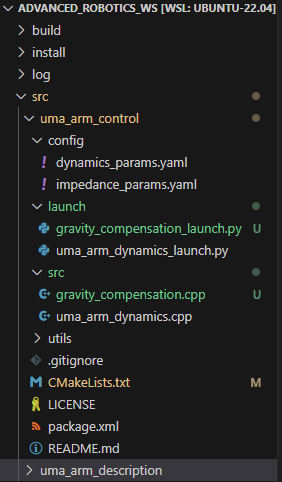
-
Now, you can compile the workspace:
3.1.2. Launch the controller
To launch the controller you'll need to do the following:
- Open one terminal and launch the uma_arm_visualization.
- Open another terminal and launch the controller.
- Open another terminal and launch the dynamics model
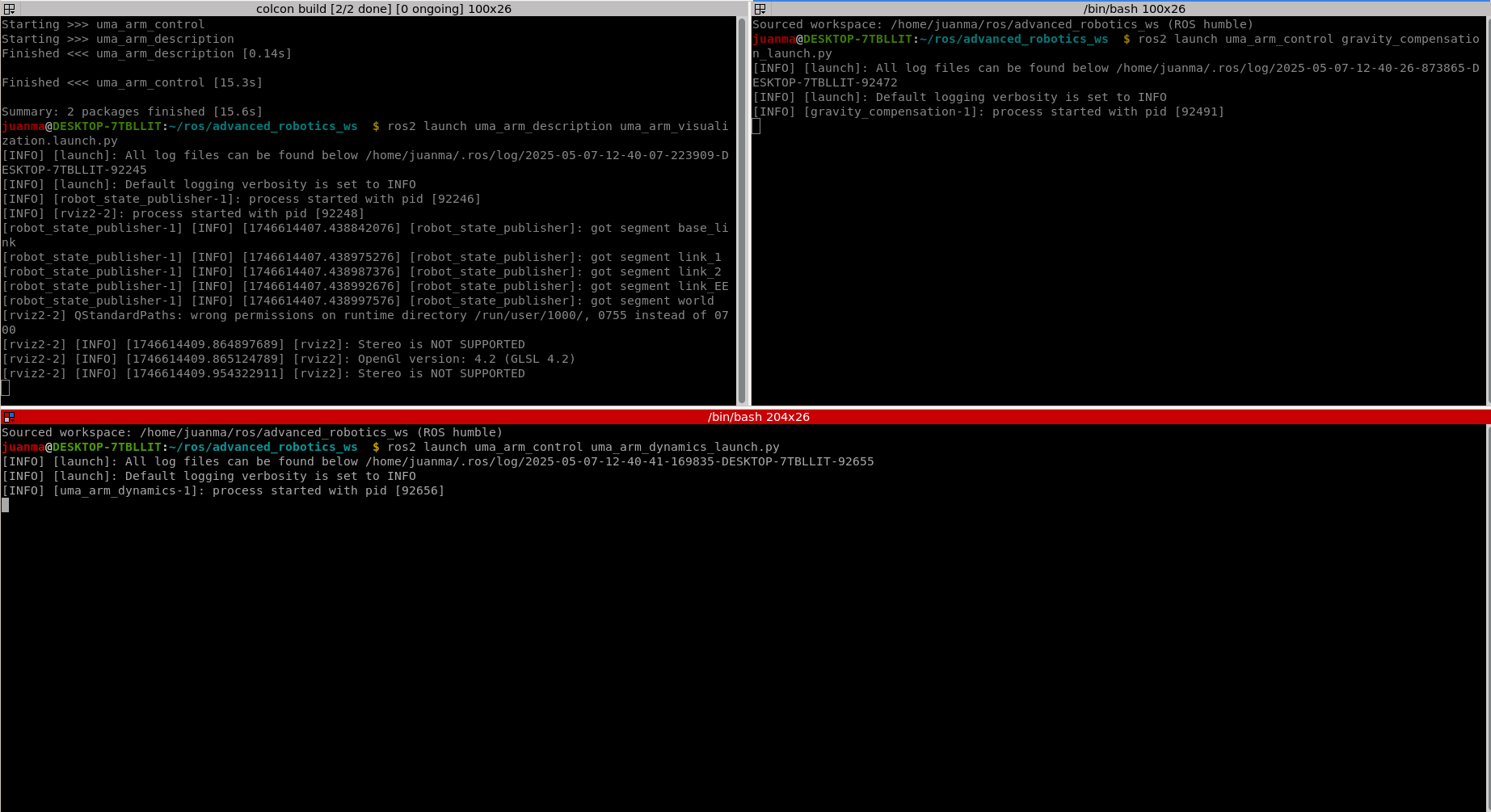
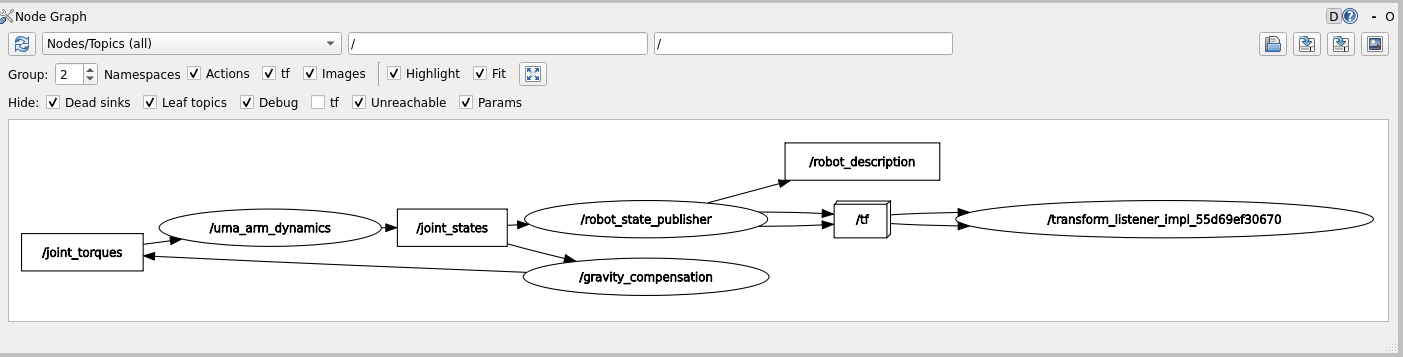
If you run rqt_graph, you should see that the gravity compensation node receives joint_state and feeds the manipulator with the computed torques.
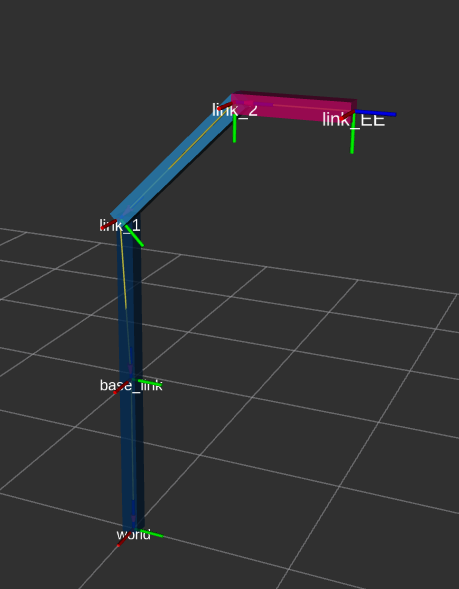
As a result, the manipulator now stays in the initial position defined by \(\mathbf{q}_0 = [45^o, -45^o]\) (note that the initial position is defined by q0 in the dynamics_params.yaml config file).
3.1.3. Simulating the force sensor
As we don't have a proper simulator where we could attach a simulated F/T sensor to the robot EE and apply forces against virtual objects, we can virtually apply forces to the robot EE. We can do this because, in the previous lab, we implemented and considered the dynamic effects of external wrenches applied to the EE in the robot dynamics model.
Hence, we can simulate an F/T sensor with a node that publishes virtual wrenches. To do this, you can use the wrench_trackbar_publisher.py utility included in the uma_control package.
Show the code
    import rclpy
    from rclpy.node import Node
    from geometry_msgs.msg import Wrench
    import tkinter as tk
    from threading import Thread
    import time

    class WrenchTrackbarPublisher(Node):
        def __init__(self):
            super().__init__('wrench_trackbar_publisher')
            self.publisher_ = self.create_publisher(Wrench, 'external_wrenches', 10)
            self.force_x = 0.0
            self.force_y = 0.0
            self.force_z = 0.0
            self.torque_x = 0.0
            self.torque_y = 0.0
            self.torque_z = 0.0
            self.continuous_mode = True

            self.root = tk.Tk()
            self.root.title("Wrench Publisher")

            self.create_trackbar('Force X', -30.0, 30.0, self.update_force_x)
            self.create_trackbar('Force Y', -30.0, 30.0, self.update_force_y)
            self.create_trackbar('Force Z', -30.0, 30.0, self.update_force_z)
            self.create_trackbar('Torque X', -10.0, 10.0, self.update_torque_x)
            self.create_trackbar('Torque Y', -10.0, 10.0, self.update_torque_y)
            self.create_trackbar('Torque Z', -10.0, 10.0, self.update_torque_z)

            self.mode_button = tk.Button(self.root, text="Switch to Instantaneous Mode", command=self.switch_mode)
            self.mode_button.pack()

            center_button = tk.Button(self.root, text="Center All", command=self.center_all)
            center_button.pack()

            # Start the publishing thread
            self.publish_thread = Thread(target=self.publish_wrench_continuously)
            self.publish_thread.start()

        def create_trackbar(self, label, min_val, max_val, callback):
            frame = tk.Frame(self.root)
            frame.pack()
            tk.Label(frame, text=f"{min_val}").pack(side=tk.LEFT)
            trackbar = tk.Scale(frame, label=label, from_=min_val, to=max_val, orient=tk.HORIZONTAL, command=callback, resolution=0.1, length=400, sliderlength=30)
            trackbar.pack(side=tk.LEFT)
            trackbar.bind("<ButtonRelease-1>", lambda event, lbl=label: self.reset_slider(lbl))
            tk.Label(frame, text=f"{max_val}").pack(side=tk.LEFT)

        def update_force_x(self, value):
            self.force_x = float(value)

        def update_force_y(self, value):
            self.force_y = float(value)

        def update_force_z(self, value):
            self.force_z = float(value)

        def update_torque_x(self, value):
            self.torque_x = float(value)

        def update_torque_y(self, value):
            self.torque_y = float(value)

        def update_torque_z(self, value):
            self.torque_z = float(value)

        def reset_slider(self, label):
            if not self.continuous_mode:
                for widget in self.root.winfo_children():
                    if isinstance(widget, tk.Frame):
                        for child in widget.winfo_children():
                            if isinstance(child, tk.Scale) and child.cget("label") == label:
                                child.set(0.0)

        def switch_mode(self):
            self.continuous_mode = not self.continuous_mode
            mode_text = "Switch to Continuous Mode" if not self.continuous_mode else "Switch to Instantaneous Mode"
            self.mode_button.config(text=mode_text)

        def center_all(self):
            for widget in self.root.winfo_children():
                if isinstance(widget, tk.Frame):
                    for child in widget.winfo_children():
                        if isinstance(child, tk.Scale):
                            child.set(0.0)

        def publish_wrench_continuously(self):
            while rclpy.ok():
                msg = Wrench()
                msg.force.x = self.force_x
                msg.force.y = self.force_y
                msg.force.z = self.force_z
                msg.torque.x = self.torque_x
                msg.torque.y = self.torque_y
                msg.torque.z = self.torque_z
                self.publisher_.publish(msg)
                time.sleep(0.001)  # Sleep for 1 millisecond (1 kHz frequency)

        def run(self):
            self.root.mainloop()

    def main(args=None):
        rclpy.init(args=args)
        node = WrenchTrackbarPublisher()
        try:
            node.run()
        except KeyboardInterrupt:
            pass
        finally:
            node.destroy_node()
            rclpy.shutdown()

    if __name__ == '__main__':
        main()
Note that you don't have to change anything in that script. You can run it by opening a terminal and running the following:
Once you have done this, you'll see a GUI that allows you to publish virtual forces and torques. Note that, as our robot has only 2 DoFs and the dynamics model considers only the 2D XY plane, only forces applied along the X and Y axes will have an effect on our robot. This GUI has two operation modes: continuous mode and instantaneous mode. You can see how they work in this video:
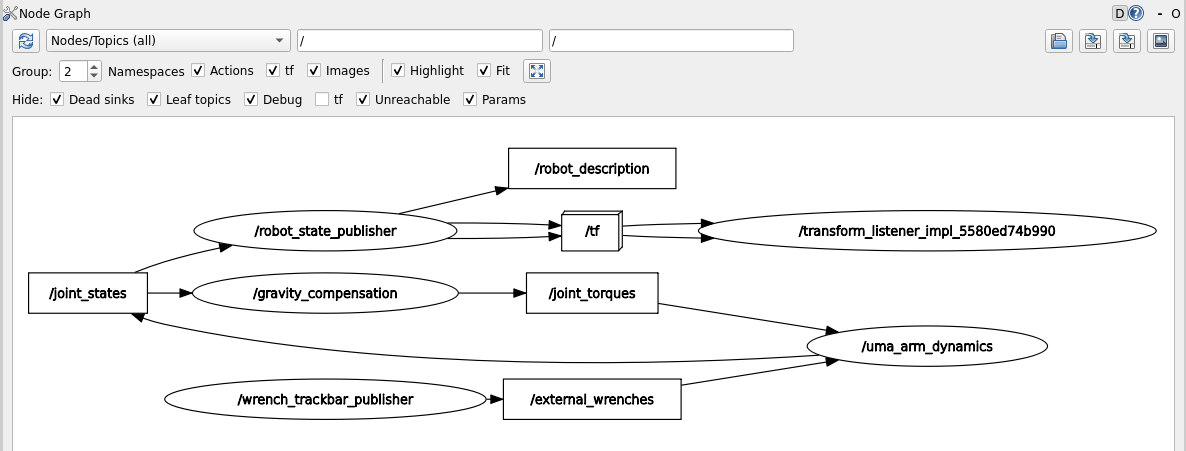
Launch the dynamics model and the gravity compensation controller and apply virtual forces. Your rqt_graph should then look like this:
Question
What is the behavior of the robot when you apply virtual forces to the EE? Use videos and/or plots to support your answer.
3.2. Linearization by inverse dynamics control
3.2.1. Implementation
Now, we can compensate the whole non-linear dynamics of the manipulator through feedback linearization. This way, we'll theoretically be able to force the manipulator to achieve a desired dynamic behavior without being affected by its own dynamics (note that this is only true when the dynamics model perfectly matches the manipulator dynamics, which won't happen in the real world).
To do this, you need to implement the following control scheme:
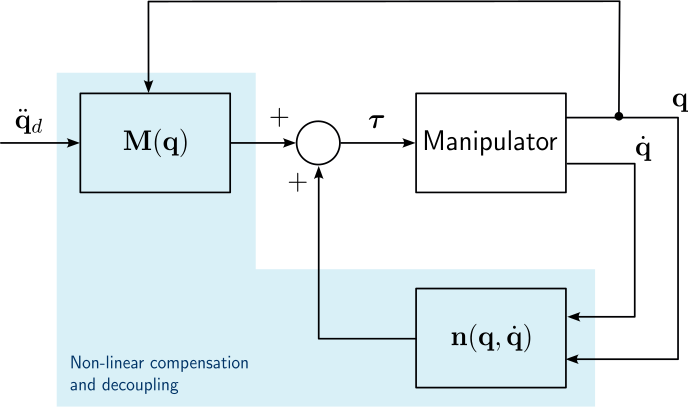
Then, we need to create a node that computes non-linear dynamics cancellation based on the desired joint accelerations (\(\ddot{\mathbf{q}}_d\)) and the current joint state (\(\mathbf{q}, \dot{\mathbf{q}}\)). The commanded joint torques computed with the inverse dynamics controller are given by:
To implement the inverse dynamics controller you need to do the following:
- Create the inverse dynamics cancellation node:
dynamics_cancellation.cpp
Show the code
    /*

    Author: Juan M. Gandarias (http://jmgandarias.com)
    email: jmgandarias@uma.es


    This script cancellate the manipulator dynamics with feedback linearization

    tau = M(q)*q'' + n(q,q')

    with n(q,q') = C(q,q')q' + Fb q' + g(q)

    Inputs: desired_joint_accelerations, joint_state(joint_positions, joint_velocities)

    Output: joint_torques


    */

    #include <rclcpp/rclcpp.hpp>
    #include <sensor_msgs/msg/joint_state.hpp>
    #include <std_msgs/msg/float64_multi_array.hpp>
    #include <geometry_msgs/msg/wrench.hpp>
    #include <chrono>
    #include <Eigen/Dense>
    #include <cmath>

    class DynamicsCancellationNode : public rclcpp::Node
    {
    public:
        DynamicsCancellationNode()
            : Node("dynamics_cancellation_node"),
              joint_positions_(Eigen::VectorXd::Zero(2)),
              joint_velocities_(Eigen::VectorXd::Zero(2)),
              desired_joint_accelerations_(Eigen::VectorXd::Zero(2)),
              joint_torques_(Eigen::VectorXd::Zero(2))
        {
            // Frequency initialization
            this->declare_parameter<double>("frequency", 1000.0);

            // Dynamics parameters initialization
            this->declare_parameter<double>("m2", 1.0);
            this->declare_parameter<double>("m1", 1.0);
            this->declare_parameter<double>("l1", 1.0);
            this->declare_parameter<double>("l2", 1.0);
            this->declare_parameter<double>("b1", 1.0);
            this->declare_parameter<double>("b2", 1.0);
            this->declare_parameter<double>("g", 9.81);
            this->declare_parameter<std::vector<double>>("q0", {0, 0});

            // Get frequency [Hz] parameter and compute period [s]
            double frequency = this->get_parameter("frequency").as_double();

            // Get dynamic parameters
            m1_ = this->get_parameter("m1").as_double();
            m2_ = this->get_parameter("m2").as_double();
            l1_ = this->get_parameter("l1").as_double();
            l2_ = this->get_parameter("l2").as_double();
            g_ = this->get_parameter("g").as_double();
            b1_ = this->get_parameter("b1").as_double();
            b2_ = this->get_parameter("b2").as_double();

            // Set initial joint state
            joint_positions_ = Eigen::VectorXd::Map(this->get_parameter("q0").as_double_array().data(), 2);

            // Create subscription to joint_states
            subscription_joint_states_ = this->create_subscription<sensor_msgs::msg::JointState>(
                "joint_states", 1, std::bind(&DynamicsCancellationNode::joint_states_callback, this, std::placeholders::_1));

            // Create subscription to joint_accelerations
            subscription_desired_joint_accelerations_ = this->create_subscription<std_msgs::msg::Float64MultiArray>(
                "desired_joint_accelerations", 1, std::bind(&DynamicsCancellationNode::desired_joint_accelerations_callback, this, std::placeholders::_1));

            // Create publishers for joint torque
            publisher_joint_torques_ = this->create_publisher<std_msgs::msg::Float64MultiArray>("joint_torques", 1);

            // Set the timer callback at a period (in milliseconds, multiply it by 1000)
            timer_ = this->create_wall_timer(
                std::chrono::milliseconds(static_cast<int>(1000 / frequency)), std::bind(&DynamicsCancellationNode::timer_callback, this));
        }

        // Timer callback - when there is a timer callback, computes the new joint acceleration, velocity and position and publishes them
        void timer_callback()
        {
            // Calculate torque to cancel the dynamic effects
            joint_torques_ = cancel_dynamics();

            // Publish data
            publish_data();
        }

    private:
        // joint_states subscription callback - when a new message arrives, updates the dynamics cancellation and publishes teh joint_torques_
        void joint_states_callback(const sensor_msgs::msg::JointState::SharedPtr msg)
        {

            // Assuming the joint names are "joint_1" and "joint_2"
            auto joint1_index = std::find(msg->name.begin(), msg->name.end(), "joint_1") - msg->name.begin();
            auto joint2_index = std::find(msg->name.begin(), msg->name.end(), "joint_2") - msg->name.begin();

            if (static_cast<std::vector<std::string>::size_type>(joint1_index) < msg->name.size() &&
                static_cast<std::vector<std::string>::size_type>(joint2_index) < msg->name.size())
            {
                joint_positions_(0) = msg->position[joint1_index];
                joint_positions_(1) = msg->position[joint2_index];
                joint_velocities_(0) = msg->velocity[joint1_index];
                joint_velocities_(1) = msg->velocity[joint2_index];
            }
        }

        // joint_states subscription callback - when a msg arrives, updates desired_joint_accelerations_
        void desired_joint_accelerations_callback(const std_msgs::msg::Float64MultiArray::SharedPtr msg)
        {
            desired_joint_accelerations_ = Eigen::VectorXd::Map(msg->data.data(), msg->data.size());
        }

        // Method to calculate joint acceleration
        Eigen::VectorXd cancel_dynamics()
        {
            // Initialize M, C, Fb, g_vec, and tau_ext

            // Initialize q1, q2, q_dot1, and q_dot2

            // Calculate matrix M

            // Calculate vector C (C is 2x1 because it already includes q_dot)

            // Calculate Fb matrix

            // Calculate g_vect

            // Calculate control torque using the dynamic model: torque = M * q_ddot + C * q_dot + Fb * q_dot + g
            Eigen::VectorXd torque(2);
            torque << 0, 0;

            return torque;
        }

        // Method to publish the joint data
        void publish_data()
        {
            // publish joint torque
            auto joint_torques_msg = std_msgs::msg::Float64MultiArray();
            joint_torques_msg.data.assign(joint_torques_.data(), joint_torques_.data() + joint_torques_.size());
            publisher_joint_torques_->publish(joint_torques_msg);
        }

        // Member variables
        // Publishers and subscribers
        rclcpp::Subscription<sensor_msgs::msg::JointState>::SharedPtr subscription_joint_states_;
        rclcpp::Subscription<std_msgs::msg::Float64MultiArray>::SharedPtr subscription_desired_joint_accelerations_;
        rclcpp::Publisher<std_msgs::msg::Float64MultiArray>::SharedPtr publisher_joint_torques_;
        rclcpp::TimerBase::SharedPtr timer_;

        // Joint variables
        Eigen::VectorXd joint_positions_;
        Eigen::VectorXd joint_velocities_;
        Eigen::VectorXd desired_joint_accelerations_;
        Eigen::VectorXd joint_torques_;

        // dynamic parameters variables
        double m1_;
        double m2_;
        double l1_;
        double l2_;
        double b1_;
        double b2_;
        double g_;
    };

    int main(int argc, char *argv[])
    {
        rclcpp::init(argc, argv);
        auto node = std::make_shared<DynamicsCancellationNode>();
        rclcpp::spin(node);
        rclcpp::shutdown();
        return 0;
    }
- You need to program the method
cancel_dynamics()to calculate the desired torques.// Method to calculate the desired joint torques Eigen::VectorXd cancel_dynamics() { // Initialize M, C, Fb, g_vec, and tau_ext // Initialize q1, q2, q_dot1, and q_dot2 // Calculate matrix M // Calculate vector C (C is 2x1 because it already includes q_dot) // Calculate Fb matrix // Calculate g_vect // Calculate control torque using the dynamic model: torque = M * q_ddot + C * q_dot + Fb * q_dot + g Eigen::VectorXd torque(2); torque << 0, 0; return torque; } - Create the
dynamics_cancellation_launch.pyfile (you need to do this in order to get the dynamic parameters from the config file). You don't need to modify this file; just include it in the launch folder.Show the code
dynamics_cancellation_launch.pyimport os from launch import LaunchDescription from launch_ros.actions import Node from ament_index_python.packages import get_package_share_directory def generate_launch_description(): config = os.path.join( get_package_share_directory('uma_arm_control'), 'config', 'dynamics_params.yaml' ) dynamics_cancellation_node = Node( package='uma_arm_control', executable='dynamics_cancellation', name='dynamics_cancellation', output='screen', parameters=[config] ) return LaunchDescription([dynamics_cancellation_node]) - Modify
CMakeLists.txtto include the new node.Show the code
CMakeLists.txt# Author: Juan M. Gandarias (http://jmgandarias.com) # email: jmgandarias@uma.es cmake_minimum_required(VERSION 3.8) project(uma_arm_control) if(CMAKE_COMPILER_IS_GNUCXX OR CMAKE_CXX_COMPILER_ID MATCHES "Clang") add_compile_options(-Wall -Wextra -Wpedantic) endif() # find dependencies find_package(ament_cmake REQUIRED) find_package(rclcpp REQUIRED) find_package(std_msgs REQUIRED) find_package(geometry_msgs REQUIRED) find_package(sensor_msgs REQUIRED) find_package(Eigen3 REQUIRED) include_directories(${EIGEN3_INCLUDE_DIR}) ## COMPILE add_executable(uma_arm_dynamics src/uma_arm_dynamics.cpp) add_executable(gravity_compensation src/gravity_compensation.cpp) add_executable(dynamics_cancellation src/dynamics_cancellation.cpp) ament_target_dependencies(uma_arm_dynamics rclcpp std_msgs sensor_msgs geometry_msgs Eigen3 ) ament_target_dependencies(gravity_compensation rclcpp std_msgs sensor_msgs Eigen3 ) ament_target_dependencies(dynamics_cancellation rclcpp std_msgs sensor_msgs geometry_msgs Eigen3 ) if(BUILD_TESTING) find_package(ament_lint_auto REQUIRED) # the following line skips the linter which checks for copyrights # comment the line when a copyright and license is added to all source files set(ament_cmake_copyright_FOUND TRUE) # the following line skips cpplint (only works in a git repo) # comment the line when this package is in a git repo and when # a copyright and license is added to all source files set(ament_cmake_cpplint_FOUND TRUE) ament_lint_auto_find_test_dependencies() endif() install(TARGETS uma_arm_dynamics dynamics_cancellation gravity_compensation DESTINATION lib/${PROJECT_NAME} ) install(DIRECTORY launch config DESTINATION share/${PROJECT_NAME}/ ) ament_package() -
Once you have done this, the
uma_arm_controlpackage should look like this: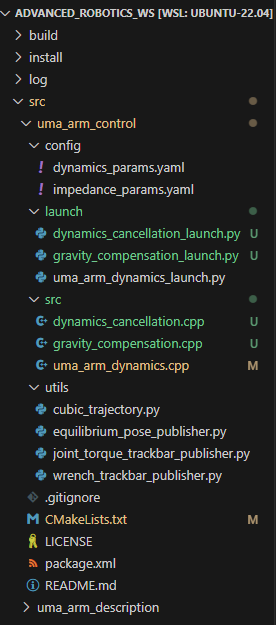
-
Now, you can compile the workspace:
3.2.2. Launch the controller
To launch the inverse dynamics controller you'll need to do the following:
- Open one terminal and launch the uma_arm_visualization.
- Open another terminal and launch the controller.
- Open another terminal and launch the dynamics model.
3.2.3. Expected results
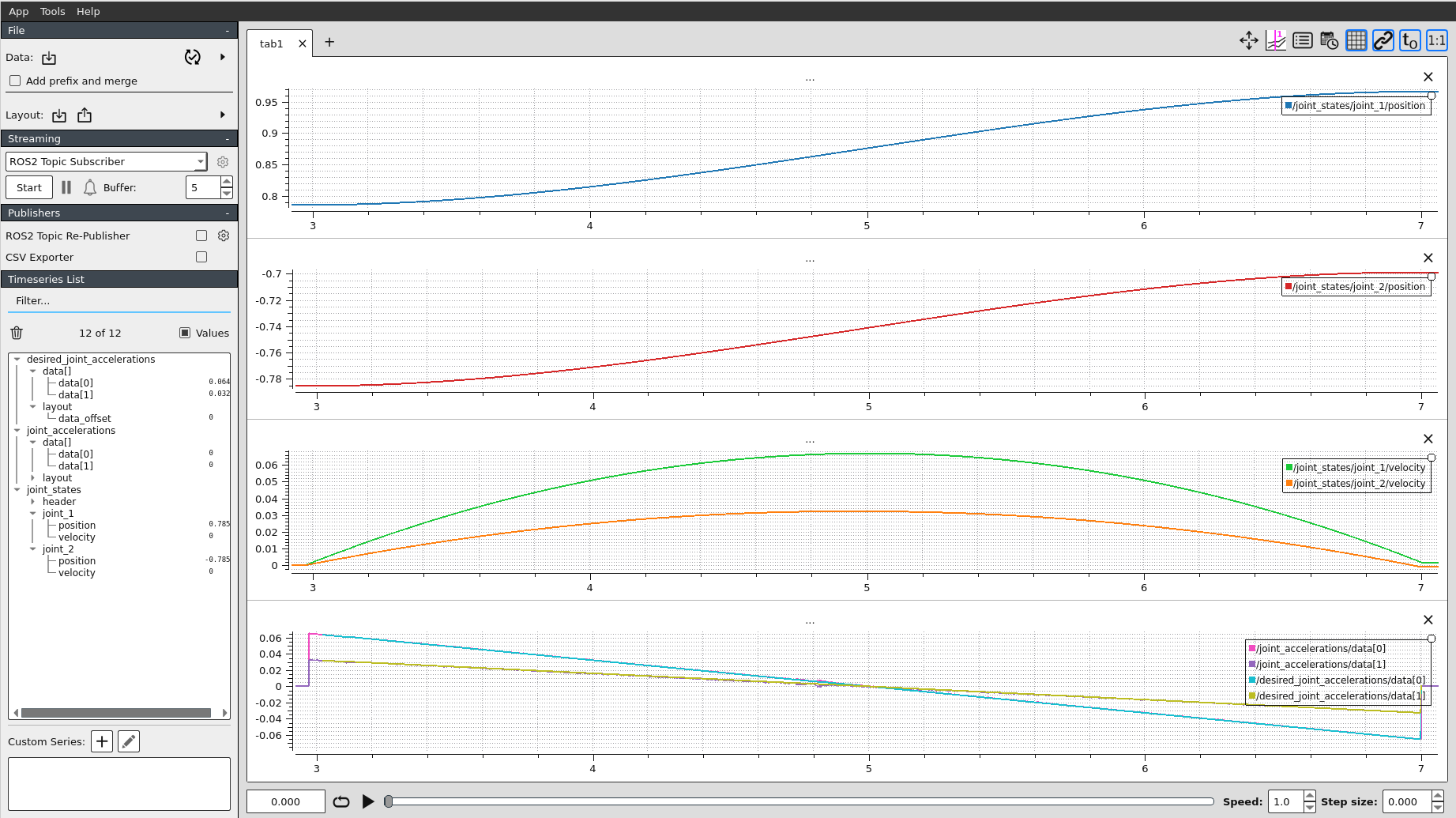
If the inverse dynamics controller works well, when a trajectory is commanded to the controller, the manipulator should exactly follow that trajectory.
We can test it by sending a cubic joint trajectory. To do this, the uma_arm_control package provides a cubic trajectory generator you can use.
You can generate the desired joint trajectory by opening a new terminal and running the following:
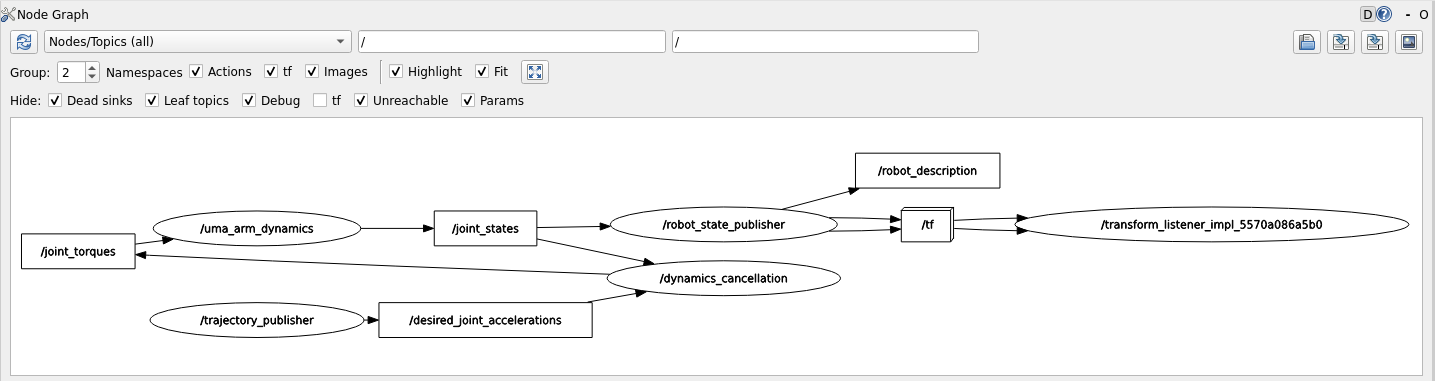
Once you have done this, your rqt_graph should then look like this:
If you record the data of the experiment, you'll see the following:
3.3. Experiments
Question
-
What happens if the dynamics compensation model is not exactly the same as the manipulator dynamics?
- Try changing the masses
m1,m2and lengthsl1,l2of the links in thedynamics_params.yaml(gravity compensation) file. What are the effects of having incorrect dynamic parameters when launching the gravity compensation controller? - Try the same for the dynamics cancellation. In this case, you can also change the parameters
b1andb2. What are the effects when launching the dynamics cancellation controller?
- Try changing the masses
-
What is the behavior of the robot under the inverse dynamics controller when you apply virtual forces to the EE? Use videos and/or plots to support your answer.
4. Joint-space PD controller with non-linear dynamics compensation
Create a node that implements the PD controller presented in the stabilizing linear control block of the follwing figure.
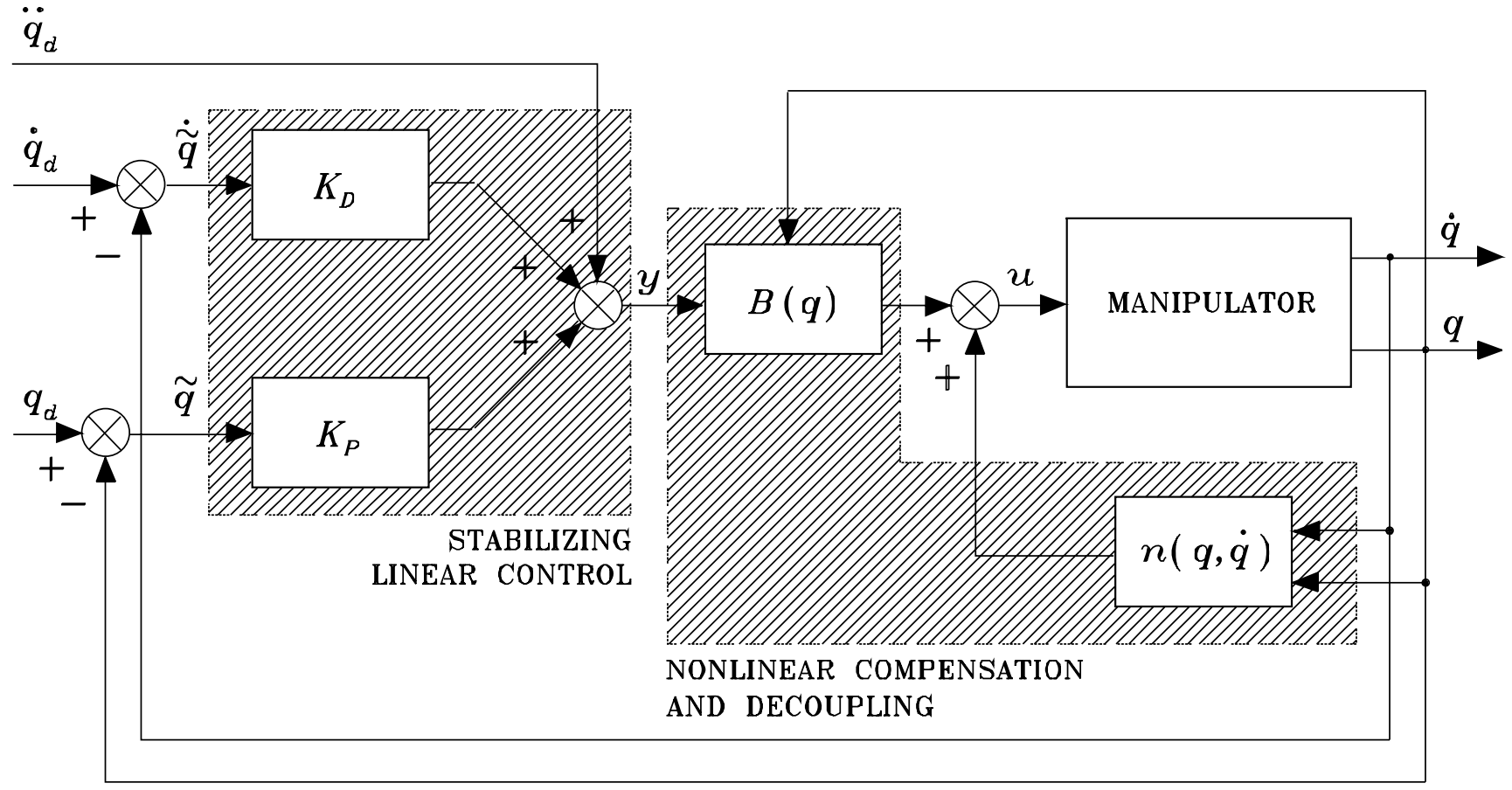 (Source: B. Siciliano, L. Sciavicco, L. Villani, and G. Oriolo, Robotics: modelling, planning and control. Springer, 2010.)
Specify a desired joint position \(\mathbf{q}_d\) (inside the joint workspace) and set \(\dot{\mathbf{q}}_d = \boldsymbol{0}\), \(\ddot{\mathbf{q}}_d = \boldsymbol{0}\).
This node must subscribe to the current joint state topic /joint_states to get the current joint positions (\(\mathbf{q}\)) and velocities (\(\dot{\mathbf{q}}\)); and it must then publish the desired joint accelerations (\(\ddot{\mathbf{q}}_d\)) in the topic /desired_joint_accelerations to which the dynamics cancellation node will subscribe.
Select and report the values chosen for \(\mathbf{K}_P\) and \(\mathbf{K}_D\). You can use MATLAB to simulate the expected dynamic behavior of the overall system.
5. Extra (optional) Operational-space PD controller with non-linear dynamics compensation
Implement the whole operational space PD controller with dynamics compensation of the follwing figure.
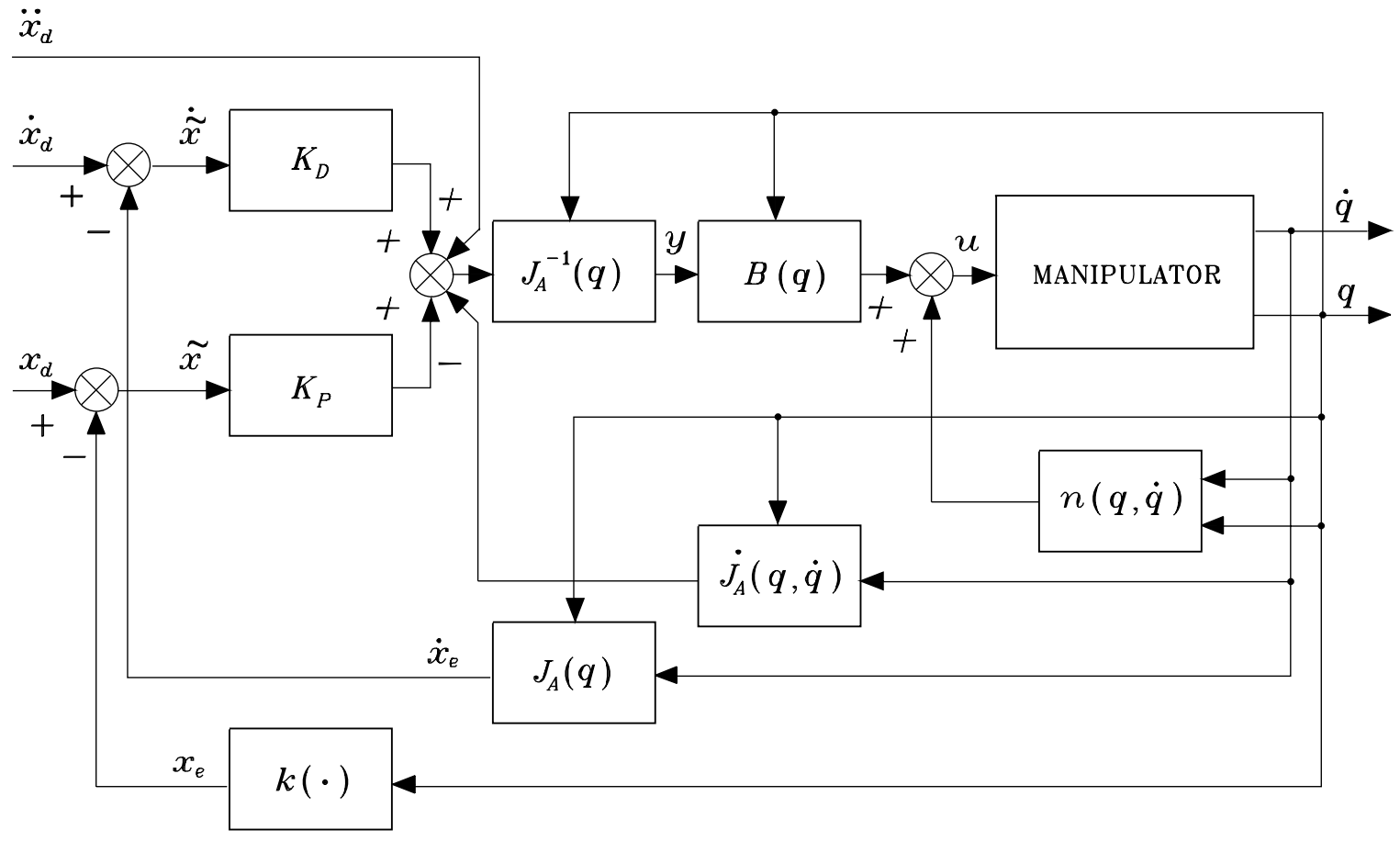 (Source: B. Siciliano, L. Sciavicco, L. Villani, and G. Oriolo, Robotics: modelling, planning and control. Springer, 2010.)
Specify a desired cartesian position \(\mathbf{x}_d\) (inside the cartesian workspace) and set \(\dot{\mathbf{x}}_d = \boldsymbol{0}\), \(\ddot{\mathbf{x}}_d = \boldsymbol{0}\).
Consider that you'll need to implement the first and second-order differential kinematics \(J_A(\boldsymbol{q})\), \(\dot{J}_A(\boldsymbol{q}, \boldsymbol{\dot{q}})\), the inverse Jacobian \(J_A^{-1}(\boldsymbol{q})\), the forward kinematics \(k(\cdot)\)